Content Management Framework: Turning a Meta-Metamodel into a Full-Stack DDD Code Generator
Introduction -- CMF, Not CMS
In 2010, the Diem Project was a Content Management Framework built on Symfony 1.4 and Doctrine. It was not WordPress. It was not Drupal. It started empty -- no blog, no comments, no preinstalled modules. The developer defined a data schema in schema.yml, declared modules in modules.yml, and Diem generated code that was 100% specific to the site's needs. The frontend composed pages from Layouts, Zones, and Widgets. The backend auto-generated admin interfaces from the schema.
Diem was a CMF -- a Content Management Framework. The distinction matters.
A CMS (Content Management System) is an application. You install it, configure it, extend it with plugins. WordPress, Drupal, Strapi -- these are applications that manage content. A developer adapts the application to the domain.
A CMF (Content Management Framework) is a framework in the developer sense. It provides primitives, DSLs, and code generation to build domain-specific applications from scratch. The developer defines the domain; the framework generates the application. Diem, Symfony CMF, and what this article describes all follow this philosophy.
This article applies the metamodeling theory from Modeling, Metamodeling, and Meta-Metamodeling in C# to build a CMF for .NET. The M3 meta-metamodel provides the foundation. On top of it, we define six M2 DSLs -- each expressed as C# attributes, each compiled by Roslyn source generators:
- DDD DSL -- aggregates, entities, value objects, commands, events, sagas
- Content DSL -- content parts, content blocks, StreamFields
- Admin DSL -- admin module generation
- Pages DSL -- page tree, layouts, zones, widgets, dynamic routing
- Workflow DSL -- editorial pipelines with stages, gates, roles, translations
- Requirements DSL -- features, epics, stories, tasks, bugs, acceptance criteria, test coverage
From a handful of attribute-decorated partial classes, the compiler produces the entire stack: domain entities, EF Core persistence, REST and GraphQL APIs, CQRS handlers, Blazor admin components, Blazor WebAssembly page widgets, and a content workflow engine.
The transformation from Diem to this CMF is:
| Diem (PHP / Symfony 1.4) | CMF (C# / .NET 10) |
|---|---|
schema.yml → Doctrine ORM |
[AggregateRoot], [Entity], [ValueObject] → Roslyn → EF Core |
modules.yml → admin + front modules |
[AdminModule] + [PageWidget] → Roslyn → Blazor components |
| Page → Layout → Zone → Widget (server-rendered) | Page → Layout → Zone → Widget (Blazor WASM SPA + API) |
| Doctrine model classes | Shared C# kernel (compiled to both server + WASM) |
dm:setup CLI |
cmf new, cmf add aggregate, cmf generate |
Admin generator (generator.yml) |
Source-generated Blazor admin CRUD |
| List/Show widgets | Source-generated Blazor WASM components consuming API |
What Diem did not have -- and what this CMF adds by learning from the broader CMF landscape:
| Origin | Pattern | CMF Attribute |
|---|---|---|
| Orchard Core (.NET) | Content Parts -- composable cross-cutting concerns | [ContentPart], [HasPart] |
| Wagtail (Django) | StreamField -- composable typed content blocks as JSON | [ContentBlock], [StreamField] |
| Drupal | Content versioning, draft/publish, taxonomy | [Versionable], [Taxonomy] |
| Symfony CMF | Dynamic routing from content tree | Page tree → URL resolution |
| Strapi | Auto REST + GraphQL API from schema | Generated API controllers + GraphQL schema |

Architecture Overview
The CMF operates on two axes: domain modeling (what the data is) and content presentation (how the data is shown). Both axes are expressed as M2 DSLs on top of the M3 meta-metamodel, compiled by multi-staged Roslyn source generators.
Shared C# Kernel
The defining architectural choice is the shared kernel. The same C# types compile to both ASP.NET (server) and Blazor WebAssembly (browser). DTOs, validation rules, widget contracts, and content block definitions live in a shared project referenced by both the server and client. This eliminates the impedance mismatch between frontend and backend that plagues JavaScript-based CMSes.
Solution Structure
The CMF ships as NuGet packages. Each DSL is a project pair: attributes (the DSL surface) and generators (the compilation pipeline).
Cmf.sln
├── src/
│   ├── Cmf.Meta.Lib/                          ← M3 attributes (MetaConcept, MetaProperty...)
│   ├── Cmf.Meta.Generators/                   ← Stage 0: metamodel registry generator
│   │
│   ├── Cmf.Ddd.Lib/                           ← M2: DDD DSL ([AggregateRoot], [Entity], [Composition]...)
│   ├── Cmf.Ddd.Abstractions/                  ← Interfaces (IRepository<T>, ICommandHandler<T>...)
│   ├── Cmf.Ddd.Generators/                    ← Stage 1+2: domain entity + CQRS generation
│   │
│   ├── Cmf.Content.Lib/                       ← M2: CMS DSL ([ContentPart], [ContentBlock]...)
│   ├── Cmf.Content.Abstractions/              ← Interfaces (IContentPart, IBlock, IVersionable...)
│   ├── Cmf.Content.Generators/                ← Stage 2: content parts + blocks generation
│   │
│   ├── Cmf.Infrastructure.EfCore/             ← EF Core integration (DbContext base, conventions)
│   ├── Cmf.Infrastructure.EfCore.Generators/  ← Stage 2+3: persistence generation
│   │
│   ├── Cmf.Infrastructure.Search/             ← Search integration (Lucene.NET / Elasticsearch)
│   ├── Cmf.Infrastructure.Media/              ← Media processing (image resize, CDN, storage)
│   │
│   ├── Cmf.Admin.Lib/                         ← M2: Admin DSL ([AdminModule], [AdminField])
│   ├── Cmf.Admin.Generators/                  ← Stage 3: Blazor admin component generation
│   │
│   ├── Cmf.Pages.Lib/                         ← M2: Page/Widget DSL + runtime entities
│   ├── Cmf.Pages.Abstractions/                ← Interfaces (IPage, IWidget, IZone, IPageRouter...)
│   ├── Cmf.Pages.Generators/                  ← Stage 3: page widget + dynamic routing generation
│   │
│   ├── Cmf.Shared/                            ← Shared kernel (DTOs, validation, contracts)
│   ├── Cmf.Cli/                               ← CLI tool (dotnet tool)
│   └── Cmf.Templates/                         ← dotnet new templates
│
├── test/
│   ├── Cmf.Ddd.Lib.Testing/                   ← Test helpers (fake repos, event assertions)
│   ├── Cmf.Infrastructure.EfCore.Testing/     ← Test helpers (in-memory DbContext)
│   ├── Cmf.Pages.Lib.Testing/                 ← Test helpers (fake page tree)
│   └── Cmf.Meta.Generators.Tests/             ← Generator unit tests
A user project scaffolded by cmf new MyStore follows the same DDD separation:
MyStore.sln
├── src/
│   ├── MyStore.Lib/                            ← Domain model (aggregates, entities, commands, events)
│   ├── MyStore.Abstractions/                   ← Domain interfaces (shared across bounded contexts)
│   ├── MyStore.Infrastructure.Postgres/        ← EF Core implementation for Postgres
│   ├── MyStore.Infrastructure.Search/          ← Search implementation
│   ├── MyStore.Infrastructure.Media/           ← Media storage implementation
│   ├── MyStore.Server/                         ← ASP.NET host (API + admin + page routing)
│   ├── MyStore.Client/                         ← Blazor WASM (SPA frontend)
│   └── MyStore.Shared/                         ← Shared kernel (DTOs, validation, widget contracts)
│
├── test/
│   ├── MyStore.Lib.Testing/                    ← Domain unit tests
│   ├── MyStore.Infrastructure.Postgres.Testing/ ← Integration tests
│   └── MyStore.Server.Testing/                 ← API integration tests
Compilation Pipeline
The multi-staged source generator pipeline from Modeling, Metamodeling, and Meta-Metamodeling in C# compiles the five DSLs:

The DDD DSL (M2) -- Domain Modeling
This DSL maps Diem's schema.yml to C# attributes. Every attribute is annotated with M3 primitives from the meta-metamodel, making the DSL self-describing and validatable at compile time.
AggregateRoot and Entity
The [AggregateRoot] attribute is the transactional consistency boundary. It inherits from [Entity] at the metamodel level and adds constraints: every aggregate root must have a strongly-typed ID and belong to a bounded context.
// ============================================================
// M2: AggregateRoot -- the DDD consistency boundary
// ============================================================

[MetaConcept("AggregateRoot")]
[MetaInherits("Entity")]
[MetaConstraint("MustHaveId",
    "Properties.Any(p => p.IsAnnotatedWith('EntityId'))",
    Message = "Every aggregate root must have a strongly-typed ID")]
[MetaConstraint("MustBelongToContext",
    "BoundedContext != null",
    Message = "Every aggregate root must belong to a bounded context")]
[AttributeUsage(AttributeTargets.Class)]
public sealed class AggregateRootAttribute : Attribute
{
    [MetaProperty("Name", Required = true)]
    public string Name { get; }

    [MetaReference("BoundedContext", "BoundedContext", Multiplicity = Multiplicity.One)]
    public string BoundedContext { get; set; }

    [MetaProperty("IsEventSourced")]
    public bool IsEventSourced { get; set; }

    public AggregateRootAttribute(string name) => Name = name;
}
The [Entity] attribute marks a class as an entity within an aggregate. Entities must be reachable via a [Composition] chain from their aggregate root -- the generator validates this at compile time.
[MetaConcept("Entity")]
[MetaConstraint("MustBeComposed",
    "IsReachableViaCompositionFrom('AggregateRoot')",
    Message = "Every entity must be reachable via [Composition] from an aggregate root")]
[AttributeUsage(AttributeTargets.Class)]
public sealed class EntityAttribute : Attribute
{
    [MetaProperty("Name", Required = true)]
    public string Name { get; }

    public EntityAttribute(string name) => Name = name;
}
The [EntityId] attribute declares a strongly-typed identifier. Each aggregate root must have exactly one.
[MetaConcept("EntityId")]
[AttributeUsage(AttributeTargets.Property)]
public sealed class EntityIdAttribute : Attribute
{
    [MetaProperty("IdType", DefaultValue = "Guid")]
    public IdType IdType { get; set; } = IdType.Guid;

    [MetaProperty("GenerationStrategy", DefaultValue = "Sequential")]
    public IdGeneration GenerationStrategy { get; set; } = IdGeneration.Sequential;
}

public enum IdType { Guid, Int, Long, String }
public enum IdGeneration { Sequential, Random, Manual }
The [Property] attribute defines a typed slot on an entity or aggregate:
[MetaConcept("Property")]
[AttributeUsage(AttributeTargets.Property)]
public sealed class PropertyAttribute : Attribute
{
    [MetaProperty("Name", Required = true)]
    public string Name { get; }

    [MetaProperty("Required")]
    public bool Required { get; set; }

    [MetaProperty("MaxLength")]
    public int? MaxLength { get; set; }

    [MetaProperty("DefaultValue")]
    public string? DefaultValue { get; set; }

    public PropertyAttribute(string name) => Name = name;
}
ValueObject
Value objects are immutable, identified by their structural content, and have no lifecycle of their own. They must be owned via [Composition].
[MetaConcept("ValueObject")]
[MetaConstraint("MustBeOwned",
    "IsOwnedViaComposition()",
    Message = "Every value object must be owned via [Composition]")]
[AttributeUsage(AttributeTargets.Class)]
public sealed class ValueObjectAttribute : Attribute
{
    [MetaProperty("Name", Required = true)]
    public string Name { get; }

    public ValueObjectAttribute(string name) => Name = name;
}

[MetaConcept("ValueComponent")]
[AttributeUsage(AttributeTargets.Property)]
public sealed class ValueComponentAttribute : Attribute
{
    [MetaProperty("Name", Required = true)]
    public string Name { get; }

    [MetaProperty("Type", Required = true)]
    public string TypeName { get; }

    [MetaProperty("Required")]
    public bool Required { get; set; }

    [MetaProperty("MaxLength")]
    public int? MaxLength { get; set; }

    public ValueComponentAttribute(string name, string typeName)
    {
        Name = name;
        TypeName = typeName;
    }
}
Usage:
[ValueObject("Money")]
public partial class Money
{
    [ValueComponent("Amount", "decimal", Required = true)]
    public partial decimal Amount { get; }

    [ValueComponent("Currency", "string", Required = true, MaxLength = 3)]
    public partial string Currency { get; }
}

[ValueObject("Address")]
public partial class Address
{
    [ValueComponent("Street", "string", Required = true, MaxLength = 200)]
    public partial string Street { get; }

    [ValueComponent("City", "string", Required = true, MaxLength = 100)]
    public partial string City { get; }

    [ValueComponent("ZipCode", "string", Required = true, MaxLength = 20)]
    public partial string ZipCode { get; }

    [ValueComponent("Country", "string", Required = true, MaxLength = 2)]
    public partial string Country { get; }
}
The generator produces sealed records with value equality, implicit conversions, and EF Core owned-type configurations.
BoundedContext and MappingContext
Bounded contexts are the strategic DDD boundary. Mapping contexts define how concepts translate between contexts.
[MetaConcept("BoundedContext")]
[AttributeUsage(AttributeTargets.Class)]
public sealed class BoundedContextAttribute : Attribute
{
    [MetaProperty("Name", Required = true)]
    public string Name { get; }

    [MetaProperty("Description")]
    public string? Description { get; set; }

    public BoundedContextAttribute(string name) => Name = name;
}

[MetaConcept("MappingContext")]
[AttributeUsage(AttributeTargets.Class)]
public sealed class MappingContextAttribute : Attribute
{
    [MetaProperty("Name", Required = true)]
    public string Name { get; }

    [MetaReference("SourceContext", "BoundedContext", Multiplicity = Multiplicity.One)]
    public string SourceContext { get; }

    [MetaReference("TargetContext", "BoundedContext", Multiplicity = Multiplicity.One)]
    public string TargetContext { get; }

    [MetaProperty("MappingType")]
    public ContextMappingType MappingType { get; set; } = ContextMappingType.AntiCorruptionLayer;

    public MappingContextAttribute(string name, string sourceContext, string targetContext)
    {
        Name = name;
        SourceContext = sourceContext;
        TargetContext = targetContext;
    }
}

public enum ContextMappingType
{
    SharedKernel,
    CustomerSupplier,
    Conformist,
    AntiCorruptionLayer,
    PublishedLanguage
}
Usage:
[BoundedContext("Catalog", Description = "Product catalog management")]
public partial class CatalogContext { }

[BoundedContext("Ordering", Description = "Order processing and fulfillment")]
public partial class OrderingContext { }

[MappingContext("CatalogToOrdering", "Catalog", "Ordering",
    MappingType = ContextMappingType.AntiCorruptionLayer)]
public partial class CatalogToOrderingMapping
{
    [MapEntity("Product", "OrderItem",
        PropertyMappings = "Name -> ProductName, Price.Amount -> UnitPrice")]
    public partial OrderItem TranslateProduct(Product source);
}
The generator produces anti-corruption layer translation services and integration events for cross-context communication.

DomainEvent, Command, and Query
Commands target aggregates. Events originate from aggregates. Queries read from aggregates. The generator validates these references at compile time.
[MetaConcept("Command")]
[MetaConstraint("MustTargetAggregate",
    "TargetAggregate != null",
    Message = "Every command must target an aggregate root")]
[AttributeUsage(AttributeTargets.Class)]
public sealed class CommandAttribute : Attribute
{
    [MetaProperty("Name", Required = true)]
    public string Name { get; }

    [MetaReference("TargetAggregate", "AggregateRoot", Multiplicity = Multiplicity.One)]
    public string TargetAggregate { get; set; }

    [MetaProperty("ReturnsResult")]
    public bool ReturnsResult { get; set; } = true;

    [MetaProperty("IdempotencyKey")]
    public string? IdempotencyKey { get; set; }

    public CommandAttribute(string name) => Name = name;
}

[MetaConcept("DomainEvent")]
[AttributeUsage(AttributeTargets.Class)]
public sealed class DomainEventAttribute : Attribute
{
    [MetaProperty("Name", Required = true)]
    public string Name { get; }

    [MetaReference("SourceAggregate", "AggregateRoot", Multiplicity = Multiplicity.One)]
    public string SourceAggregate { get; set; }

    [MetaProperty("Version")]
    public int Version { get; set; } = 1;

    public DomainEventAttribute(string name) => Name = name;
}

[MetaConcept("Query")]
[AttributeUsage(AttributeTargets.Class)]
public sealed class QueryAttribute : Attribute
{
    [MetaProperty("Name", Required = true)]
    public string Name { get; }

    [MetaReference("SourceAggregate", "AggregateRoot", Multiplicity = Multiplicity.One)]
    public string SourceAggregate { get; set; }

    [MetaProperty("IsCacheable")]
    public bool IsCacheable { get; set; }

    [MetaProperty("CacheDurationSeconds")]
    public int CacheDurationSeconds { get; set; } = 300;

    public QueryAttribute(string name) => Name = name;
}
Usage:
[Command("CreateOrder", TargetAggregate = "Order", ReturnsResult = true)]
public partial class CreateOrderCommand
{
    [Property("CustomerId", Required = true)]
    public partial CustomerId CustomerId { get; }

    [Property("ShippingAddress", Required = true)]
    public partial Address ShippingAddress { get; }
}

[DomainEvent("OrderPlaced", SourceAggregate = "Order")]
public partial class OrderPlacedEvent
{
    [Property("OrderId", Required = true)]
    public partial OrderId OrderId { get; }

    [Property("CustomerId", Required = true)]
    public partial CustomerId CustomerId { get; }

    [Property("Total", Required = true)]
    public partial Money Total { get; }

    [Property("Timestamp", Required = true)]
    public partial DateTimeOffset Timestamp { get; }
}

[Query("GetOrderById", SourceAggregate = "Order", IsCacheable = true)]
public partial class GetOrderByIdQuery
{
    [Property("OrderId", Required = true)]
    public partial OrderId OrderId { get; }
}
Saga
Sagas coordinate processes that span multiple aggregates or bounded contexts. They are state machines with compensation logic.
[MetaConcept("Saga")]
[AttributeUsage(AttributeTargets.Class)]
public sealed class SagaAttribute : Attribute
{
    [MetaProperty("Name", Required = true)]
    public string Name { get; }

    [MetaReference("StartsWithEvent", "DomainEvent", Multiplicity = Multiplicity.One)]
    public string StartsWithEvent { get; set; }

    [MetaProperty("CompensationStrategy")]
    public CompensationStrategy CompensationStrategy { get; set; } = CompensationStrategy.Backward;

    public SagaAttribute(string name) => Name = name;
}

[MetaConcept("SagaStep")]
[AttributeUsage(AttributeTargets.Method)]
public sealed class SagaStepAttribute : Attribute
{
    [MetaProperty("Order", Required = true)]
    public int Order { get; }

    [MetaReference("Command", "Command", Multiplicity = Multiplicity.One)]
    public string Command { get; set; }

    [MetaReference("CompensatingCommand", "Command")]
    public string? CompensatingCommand { get; set; }

    [MetaProperty("TimeoutSeconds")]
    public int TimeoutSeconds { get; set; } = 30;

    public SagaStepAttribute(int order) => Order = order;
}

public enum CompensationStrategy { Backward, Forward, Custom }
Usage:
[Saga("OrderFulfillment", StartsWithEvent = "OrderPlaced",
    CompensationStrategy = CompensationStrategy.Backward)]
public partial class OrderFulfillmentSaga
{
    [SagaStep(1, Command = "ReserveInventory",
        CompensatingCommand = "ReleaseInventory", TimeoutSeconds = 30)]
    public partial SagaStepResult ReserveStock();

    [SagaStep(2, Command = "ProcessPayment",
        CompensatingCommand = "RefundPayment", TimeoutSeconds = 60)]
    public partial SagaStepResult ChargeCustomer();

    [SagaStep(3, Command = "CreateShipment")]
    public partial SagaStepResult Ship();
}
The generator produces a state machine implementation with typed states, compensation paths, and timeout handling:

Composition, Ownership, and Persistence
DDD composition semantics drive EF Core mapping. The three relationship types -- Composition, Association, Aggregation -- each produce specific EF Core configurations. Optional [Table], [Column], and [Index] attributes override conventions when needed.
The Three Relationship Types
[MetaConcept("Composition")]
[AttributeUsage(AttributeTargets.Property)]
public sealed class CompositionAttribute : Attribute { }

[MetaConcept("Association")]
[AttributeUsage(AttributeTargets.Property)]
public sealed class AssociationAttribute : Attribute { }

[MetaConcept("Aggregation")]
[AttributeUsage(AttributeTargets.Property)]
public sealed class AggregationAttribute : Attribute { }
[Composition] (filled diamond) -- lifecycle ownership. The parent controls the child's existence. What the generator produces depends on the target type and the property's multiplicity:
| Property Type | Target Type | Generated EF Core |
|---|---|---|
T |
[ValueObject] |
OwnsOne<T>() (embedded in parent table) |
IReadOnlyList<T> |
[ValueObject] |
OwnsMany<T>() (embedded collection) |
T |
[Entity] |
HasOne<T>().IsRequired().OnDelete(Cascade) |
IReadOnlyList<T> |
[Entity] |
HasMany<T>().OnDelete(Cascade) |
[Association] -- cross-aggregate reference. No lifecycle control. Aggregates are independent consistency boundaries, so associations never cascade:
| Property Type | Generated EF Core |
|---|---|
T |
HasOne<T>().WithMany().OnDelete(SetNull) |
T? |
HasOne<T>().WithMany().IsRequired(false).OnDelete(SetNull) |
IReadOnlyList<T> |
HasMany<T>().WithMany() (join table auto-generated) |
[Aggregation] (empty diamond) -- weak ownership. There is an ownership direction, but the child survives parent deletion:
| Property Type | Generated EF Core |
|---|---|
T |
HasOne<T>().WithMany().OnDelete(SetNull) |
IReadOnlyList<T> |
HasMany<T>().WithOne().OnDelete(SetNull) |
Compile-Time Ownership Validation
Stage 1 of the source generator pipeline validates ownership rules (see also Roslyn Analyzers & Quality Gates for the broader quality enforcement strategy):
- Every
[ValueObject]must be owned via[Composition]somewhere in the model. If a value object is declared but never composed into an aggregate, the generator produces a compiler error:DSL005: ValueObject 'Money' is not owned by any aggregate via [Composition]. - Every
[Entity]within an aggregate must be reachable via a[Composition]chain from the[AggregateRoot]. A floating entity produces:DSL006: Entity 'OrderLine' is not reachable via [Composition] from any AggregateRoot. - Cross-aggregate
[Composition]is forbidden. An aggregate root cannot compose an entity that belongs to another aggregate:DSL007: [Composition] cannot cross aggregate boundaries. 'Product' belongs to 'Catalog' context but is composed from 'Order' in 'Ordering' context.
Complete Example
[AggregateRoot("Order", BoundedContext = "Ordering")]
public partial class Order
{
    [EntityId]
    public partial OrderId Id { get; }

    [Property("OrderDate", Required = true)]
    public partial DateTime OrderDate { get; }

    [Property("Status", Required = true)]
    public partial OrderStatus Status { get; }

    [Composition] // 1-to-many entity → HasMany + Cascade
    public partial IReadOnlyList<OrderLine> Lines { get; }

    [Composition] // 1-to-1 entity → HasOne + Cascade
    public partial PaymentDetails Payment { get; }

    [Composition] // ValueObject → OwnsOne (embedded)
    public partial ShippingAddress ShippingAddress { get; }

    [Composition] // ValueObject collection → OwnsMany
    public partial IReadOnlyList<OrderTag> Tags { get; }

    [Association] // Cross-aggregate ref → no cascade
    public partial CustomerId CustomerId { get; }
}

[Entity("OrderLine")]
public partial class OrderLine
{
    [EntityId]
    public partial OrderLineId Id { get; }

    [Property("Sku", Required = true, MaxLength = 50)]
    public partial string Sku { get; }

    [Property("Quantity", Required = true)]
    public partial int Quantity { get; }

    [Composition] // ValueObject → OwnsOne
    public partial Money UnitPrice { get; }
}

[Entity("PaymentDetails")]
public partial class PaymentDetails
{
    [EntityId]
    public partial PaymentDetailsId Id { get; }

    [Property("Method", Required = true)]
    public partial PaymentMethod Method { get; }

    [Composition] // ValueObject → OwnsOne
    public partial Money Amount { get; }

    [Property("TransactionRef")]
    public partial string? TransactionRef { get; }
}
The EF Core generator derives the following configuration from the composition tree:
// <auto-generated/>
namespace MyStore.Infrastructure.Postgres.Configurations;

public sealed class OrderConfiguration : IEntityTypeConfiguration<Order>
{
    public void Configure(EntityTypeBuilder<Order> builder)
    {
        builder.ToTable("Orders", "ordering");
        builder.HasKey(e => e.Id);

        // Strongly-typed ID conversion
        builder.Property(e => e.Id)
            .HasConversion(id => id.Value, v => new OrderId(v));

        builder.Property(e => e.OrderDate).IsRequired();
        builder.Property(e => e.Status).IsRequired()
            .HasConversion<string>();

        // [Composition] IReadOnlyList<OrderLine> → HasMany + Cascade
        builder.HasMany(e => e.Lines)
            .WithOne()
            .HasForeignKey("OrderId")
            .OnDelete(DeleteBehavior.Cascade);

        // [Composition] PaymentDetails → HasOne + Cascade (1-to-1)
        builder.HasOne(e => e.Payment)
            .WithOne()
            .HasForeignKey<PaymentDetails>("OrderId")
            .IsRequired()
            .OnDelete(DeleteBehavior.Cascade);

        // [Composition] ShippingAddress (ValueObject) → OwnsOne
        builder.OwnsOne(e => e.ShippingAddress, owned =>
        {
            owned.Property(a => a.Street).HasColumnName("ShippingAddress_Street")
                .IsRequired().HasMaxLength(200);
            owned.Property(a => a.City).HasColumnName("ShippingAddress_City")
                .IsRequired().HasMaxLength(100);
            owned.Property(a => a.ZipCode).HasColumnName("ShippingAddress_ZipCode")
                .IsRequired().HasMaxLength(20);
            owned.Property(a => a.Country).HasColumnName("ShippingAddress_Country")
                .IsRequired().HasMaxLength(2);
        });

        // [Composition] IReadOnlyList<OrderTag> (ValueObject) → OwnsMany
        builder.OwnsMany(e => e.Tags, owned =>
        {
            owned.ToTable("Order_Tags", "ordering");
            owned.WithOwner().HasForeignKey("OrderId");
        });

        // [Association] CustomerId → no cascade
        builder.Property(e => e.CustomerId)
            .HasConversion(id => id.Value, v => new CustomerId(v));
    }
}
Convention Overrides
The default EF Core mapping is 100% derived from DDD semantics. For cases where conventions do not fit, optional attributes override specific settings:
[AggregateRoot("Order", BoundedContext = "Ordering")]
[Table("order_headers", Schema = "sales")]           // override table name
[Index("Status", "OrderDate")]                        // add index
public partial class Order
{
    [EntityId]
    [Column("order_id", TypeName = "uniqueidentifier")] // override column
    public partial OrderId Id { get; }

    [Property("Status", Required = true)]
    [HasConversion(typeof(OrderStatusConverter))]        // custom converter
    public partial OrderStatus Status { get; }
}
These overrides are optional. The default mapping derived from [Composition], [Association], and [Aggregation] is the primary interface. Override attributes are escape hatches, not the norm.
Aggregate Boundary = Transaction Boundary
One [AggregateRoot] equals one DbContext.SaveChangesAsync() scope. All entities reachable via [Composition] are saved atomically within a single transaction. Cross-aggregate [Association] references are eventually consistent, synchronized via domain events.
The generated repository enforces this boundary:
// <auto-generated/>
namespace MyStore.Infrastructure.Postgres.Repositories;

public sealed class OrderRepository : IOrderRepository
{
    private readonly OrderingDbContext _dbContext;
    private readonly IDomainEventBus _eventBus;

    public OrderRepository(OrderingDbContext dbContext, IDomainEventBus eventBus)
    {
        _dbContext = dbContext;
        _eventBus = eventBus;
    }

    public async Task<Order?> GetByIdAsync(OrderId id, CancellationToken ct)
    {
        return await _dbContext.Orders
            .Include(o => o.Lines)
            .Include(o => o.Payment)
            .FirstOrDefaultAsync(o => o.Id == id, ct);
    }

    public async Task SaveAsync(Order aggregate, CancellationToken ct)
    {
        // Single SaveChanges = single transaction
        // Includes Order + all composed OrderLines + PaymentDetails
        // + ShippingAddress (owned) + Tags (owned)
        _dbContext.Orders.Update(aggregate);
        await _dbContext.SaveChangesAsync(ct);

        // Domain events published AFTER successful commit
        await _eventBus.PublishAsync(aggregate.DomainEvents, ct);
        aggregate.ClearDomainEvents();
    }

    public async Task DeleteAsync(Order aggregate, CancellationToken ct)
    {
        // Cascade delete handles all composed entities
        _dbContext.Orders.Remove(aggregate);
        await _dbContext.SaveChangesAsync(ct);
    }
}
Migration Story
When [Composition] relationships change, cmf migrate detects the model diff and generates an EF Core migration whose name reflects the DDD intent:
# Developer adds a Discount value object to Order:
#   [Composition] public partial Discount Discount { get; }

$ cmf migrate
  Detected model change: Order gained [Composition] Discount (ValueObject)
  Generated migration: 20260319_AddDiscountToOrder
  Applied OwnsOne<Discount> to OrderConfiguration

# Developer promotes OrderStatus from enum to Entity:
#   [Composition] public partial OrderStatusEntity Status { get; }

$ cmf migrate
  Detected model change: Order.Status changed from Property to [Composition] Entity
  Generated migration: 20260319_PromoteOrderStatusToEntity
  Created OrderStatusEntity table with FK to Orders
The migration names are auto-derived from the DDD operation -- not from column-level changes. AddDiscountToOrder is more meaningful than AddColumn_Discount_Amount_Discount_Currency.
The Admin Module DSL (M2) -- Backend Management
This DSL maps Diem's modules.yml and generator.yml to C# attributes. In Diem, a module declaration in YAML auto-generated an admin interface with list views, forms, filters, and batch actions. The CMF does the same, but with compile-time type safety and Blazor component generation.
AdminModule
The [AdminModule] attribute links an admin interface to an aggregate root:
[MetaConcept("AdminModule")]
[MetaConstraint("MustTargetAggregate",
    "Aggregate != null",
    Message = "Every admin module must target an aggregate root")]
[AttributeUsage(AttributeTargets.Class)]
public sealed class AdminModuleAttribute : Attribute
{
    [MetaProperty("Name", Required = true)]
    public string Name { get; }

    [MetaReference("Aggregate", "AggregateRoot", Multiplicity = Multiplicity.One)]
    public string Aggregate { get; set; }

    [MetaProperty("Icon")]
    public string? Icon { get; set; }

    [MetaProperty("MenuGroup")]
    public string? MenuGroup { get; set; }

    [MetaProperty("MenuOrder")]
    public int MenuOrder { get; set; } = 100;

    public AdminModuleAttribute(string name) => Name = name;
}
Convention: if no [AdminModule] is declared for an aggregate root, one is auto-generated with default settings. The explicit attribute overrides presentation.
AdminField
The [AdminField] attribute controls how each property appears in list views and forms:
[MetaConcept("AdminField")]
[AttributeUsage(AttributeTargets.Property)]
public sealed class AdminFieldAttribute : Attribute
{
    [MetaProperty("Name", Required = true)]
    public string Name { get; }

    [MetaProperty("ListVisible")]
    public bool ListVisible { get; set; } = true;

    [MetaProperty("ListSortable")]
    public bool ListSortable { get; set; } = true;

    [MetaProperty("FormGroup")]
    public string? FormGroup { get; set; }

    [MetaProperty("FormOrder")]
    public int FormOrder { get; set; } = 100;

    [MetaProperty("FormWidget")]
    public FormWidgetType FormWidget { get; set; } = FormWidgetType.Auto;

    public AdminFieldAttribute(string name) => Name = name;
}

[MetaConcept("AdminFilter")]
[AttributeUsage(AttributeTargets.Property)]
public sealed class AdminFilterAttribute : Attribute
{
    [MetaProperty("FilterType")]
    public FilterType FilterType { get; set; } = FilterType.Auto;
}

public enum FormWidgetType
{
    Auto,           // inferred from property type
    TextBox,
    TextArea,
    RichText,
    Dropdown,
    DatePicker,
    DateRangePicker,
    MediaPicker,
    RelationPicker,
    Toggle,
    ColorPicker,
    JsonEditor
}

public enum FilterType { Auto, Equals, Contains, Range, MultiSelect }
AdminAction
Batch operations on selected records, linking to existing [Command] definitions:
[MetaConcept("AdminAction")]
[AttributeUsage(AttributeTargets.Class, AllowMultiple = true)]
public sealed class AdminActionAttribute : Attribute
{
    [MetaProperty("Name", Required = true)]
    public string Name { get; }

    [MetaReference("Command", "Command", Multiplicity = Multiplicity.One)]
    public string Command { get; set; }

    [MetaProperty("Icon")]
    public string? Icon { get; set; }

    [MetaProperty("RequiresConfirmation")]
    public bool RequiresConfirmation { get; set; } = true;

    [MetaProperty("IsBatch")]
    public bool IsBatch { get; set; } = true;

    public AdminActionAttribute(string name) => Name = name;
}
Complete Admin Module Example
[AdminModule("Products", Aggregate = "Product",
    Icon = "package", MenuGroup = "Catalog", MenuOrder = 1)]
[AdminAction("Publish", Command = "PublishProduct", Icon = "globe")]
[AdminAction("Unpublish", Command = "UnpublishProduct", Icon = "eye-off")]
[AdminAction("Delete", Command = "DeleteProduct", Icon = "trash",
    RequiresConfirmation = true)]
public partial class ProductAdminModule
{
    [AdminField("Name", ListVisible = true, ListSortable = true,
        FormGroup = "General", FormOrder = 1)]
    [AdminFilter(FilterType = FilterType.Contains)]
    public partial string Name { get; }

    [AdminField("Sku", ListVisible = true, ListSortable = true,
        FormGroup = "General", FormOrder = 2)]
    public partial string Sku { get; }

    [AdminField("Price", ListVisible = true, ListSortable = true,
        FormGroup = "Pricing", FormOrder = 1,
        FormWidget = FormWidgetType.Auto)]
    public partial Money Price { get; }

    [AdminField("Category", ListVisible = true,
        FormGroup = "Classification", FormOrder = 1,
        FormWidget = FormWidgetType.RelationPicker)]
    [AdminFilter(FilterType = FilterType.MultiSelect)]
    public partial CategoryId CategoryId { get; }

    [AdminField("Description", ListVisible = false,
        FormGroup = "Content", FormOrder = 1,
        FormWidget = FormWidgetType.RichText)]
    public partial string Description { get; }

    [AdminField("MainImage", ListVisible = false,
        FormGroup = "Media", FormOrder = 1,
        FormWidget = FormWidgetType.MediaPicker)]
    public partial MediaRef MainImage { get; }
}
The generator produces three Blazor components: a list view with sortable columns and filters, a detail form with grouped fields and appropriate input widgets, and a toolbar with batch action buttons.
Diem vs CMF: Side-by-Side
What was generator.yml in Diem becomes type-safe C# attributes:
# Diem generator.yml (YAML, runtime interpretation)
generator:
  class: sfDoctrineGenerator
  param:
    model_class: Product
    theme: admin
    config:
      list:
        display: [name, sku, price, category]
        sort: [name, asc]
      filter:
        display: [name, category]
      form:
        display:
          General: [name, sku]
          Pricing: [price]
          Classification: [category]
Content: [description]// CMF (C# attributes, compile-time validation)
[AdminModule("Products", Aggregate = "Product")]
public partial class ProductAdminModule
{
[AdminField("Name", ListSortable = true)]
[AdminFilter(FilterType = FilterType.Contains)]
public partial string Name { get; }
// ...
}The CMF version is type-checked at compile time: if Product does not have a Name property, the generator reports a compiler error. Diem's YAML would fail silently at runtime.

Content Parts and Blocks DSL (M2) -- Composable Content
This DSL synthesizes two patterns from the broader CMF landscape: Content Parts from Orchard Core (.NET) and StreamField from Wagtail (Django).
Content Parts -- Horizontal Composition
A Content Part is a reusable cross-cutting concern that adds a group of properties and behavior to any content type. It is the CMS equivalent of a mixin or trait.
[MetaConcept("ContentPart")]
[AttributeUsage(AttributeTargets.Class)]
public sealed class ContentPartAttribute : Attribute
{
    [MetaProperty("Name", Required = true)]
    public string Name { get; }

    public ContentPartAttribute(string name) => Name = name;
}

[MetaConcept("PartField")]
[AttributeUsage(AttributeTargets.Property)]
public sealed class PartFieldAttribute : Attribute
{
    [MetaProperty("Name", Required = true)]
    public string Name { get; }

    [MetaProperty("Required")]
    public bool Required { get; set; }

    [MetaProperty("MaxLength")]
    public int? MaxLength { get; set; }

    public PartFieldAttribute(string name) => Name = name;
}

[MetaConcept("HasPart")]
[AttributeUsage(AttributeTargets.Class, AllowMultiple = true)]
public sealed class HasPartAttribute : Attribute
{
    [MetaReference("Part", "ContentPart", Multiplicity = Multiplicity.One)]
    public string Part { get; }

    public HasPartAttribute(string part) => Part = part;
}
Defining parts:
[ContentPart("Routable")]
public partial class RoutablePart
{
    [PartField("Slug", Required = true, MaxLength = 200)]
    public partial string Slug { get; }

    [PartField("CanonicalUrl")]
    public partial string? CanonicalUrl { get; }
}

[ContentPart("Seoable")]
public partial class SeoablePart
{
    [PartField("MetaTitle", MaxLength = 70)]
    public partial string? MetaTitle { get; }

    [PartField("MetaDescription", MaxLength = 160)]
    public partial string? MetaDescription { get; }

    [PartField("OpenGraphImage")]
    public partial MediaRef? OpenGraphImage { get; }

    [PartField("NoIndex")]
    public partial bool NoIndex { get; set; }
}

[ContentPart("Taggable")]
public partial class TaggablePart
{
    [PartField("Tags")]
    public partial IReadOnlyList<TaxonomyNodeRef> Tags { get; }
}

[ContentPart("Auditable")]
public partial class AuditablePart
{
    [PartField("CreatedAt")] public partial DateTimeOffset CreatedAt { get; }
    [PartField("CreatedBy")] public partial string CreatedBy { get; }
    [PartField("UpdatedAt")] public partial DateTimeOffset UpdatedAt { get; }
    [PartField("UpdatedBy")] public partial string UpdatedBy { get; }
}
Attaching parts to an aggregate:
[AggregateRoot("Product", BoundedContext = "Catalog")]
[HasPart("Routable")]
[HasPart("Seoable")]
[HasPart("Taggable")]
[HasPart("Auditable")]
public partial class Product
{
    [EntityId] public partial ProductId Id { get; }
    [Property("Name", Required = true, MaxLength = 200)]
    public partial string Name { get; }
    [Composition] public partial Money Price { get; }
    [Composition] public partial IReadOnlyList<ProductVariant> Variants { get; }
}

// Generated: Product now has these additional properties:
// .Slug, .CanonicalUrl                          (from Routable)
// .MetaTitle, .MetaDescription, .OpenGraphImage  (from Seoable)
// .Tags                                          (from Taggable)
// .CreatedAt, .CreatedBy, .UpdatedAt, .UpdatedBy (from Auditable)
The generator extends the partial class with part properties, adds EF Core column mappings, and includes part fields in DTOs and admin forms.
Content Blocks -- Vertical Composition
Content Blocks are typed, composable content units stored as structured JSON. They replace free-form rich text with structured, validated, renderable content.
Three block primitives:
[MetaConcept("StructBlock")]
[AttributeUsage(AttributeTargets.Class)]
public sealed class StructBlockAttribute : Attribute
{
    [MetaProperty("Name", Required = true)]
    public string Name { get; }

    public StructBlockAttribute(string name) => Name = name;
}

[MetaConcept("ListBlock")]
[AttributeUsage(AttributeTargets.Class)]
public sealed class ListBlockAttribute : Attribute
{
    [MetaProperty("Name", Required = true)]
    public string Name { get; }

    [MetaReference("ItemBlock", "StructBlock", Multiplicity = Multiplicity.One)]
    public string ItemBlock { get; set; }

    public ListBlockAttribute(string name) => Name = name;
}

[MetaConcept("StreamBlock")]
[AttributeUsage(AttributeTargets.Class)]
public sealed class StreamBlockAttribute : Attribute
{
    [MetaProperty("Name", Required = true)]
    public string Name { get; }

    [MetaProperty("AllowedBlocks", Required = true)]
    public string[] AllowedBlocks { get; set; }

    public StreamBlockAttribute(string name) => Name = name;
}

[MetaConcept("BlockField")]
[AttributeUsage(AttributeTargets.Property)]
public sealed class BlockFieldAttribute : Attribute
{
    [MetaProperty("Name", Required = true)]
    public string Name { get; }

    [MetaProperty("Required")]
    public bool Required { get; set; }

    public BlockFieldAttribute(string name) => Name = name;
}

[MetaConcept("StreamField")]
[AttributeUsage(AttributeTargets.Property)]
public sealed class StreamFieldAttribute : Attribute
{
    [MetaProperty("Name", Required = true)]
    public string Name { get; }

    [MetaReference("StreamBlock", "StreamBlock", Multiplicity = Multiplicity.One)]
    public string StreamBlock { get; set; }

    public StreamFieldAttribute(string name) => Name = name;
}
Defining blocks:
[StructBlock("Hero")]
public partial class HeroBlock
{
    [BlockField("Title", Required = true)]
    public partial string Title { get; }

    [BlockField("Subtitle")]
    public partial string? Subtitle { get; }

    [BlockField("Image")]
    public partial MediaRef? BackgroundImage { get; }

    [BlockField("CallToAction")]
    public partial Link? Cta { get; }
}

[StructBlock("Testimonial")]
public partial class TestimonialBlock
{
    [BlockField("Quote", Required = true)]
    public partial string Quote { get; }

    [BlockField("Author")]
    public partial string? Author { get; }

    [BlockField("Rating")]
    public partial int? Rating { get; }
}

[StructBlock("RichText")]
public partial class RichTextBlock
{
    [BlockField("Content", Required = true)]
    public partial string HtmlContent { get; }
}

[ListBlock("Gallery", ItemBlock = "Image")]
public partial class GalleryBlock { }

[StreamBlock("PageContent",
    AllowedBlocks = new[] { "Hero", "RichText", "Testimonial", "Gallery" })]
public partial class PageContentStream { }
Using a StreamField on an aggregate:
[AggregateRoot("Article", BoundedContext = "Content")]
[HasPart("Routable")]
[HasPart("Seoable")]
[HasPart("Auditable")]
public partial class Article
{
    [EntityId] public partial ArticleId Id { get; }

    [Property("Title", Required = true, MaxLength = 200)]
    public partial string Title { get; }

    [Property("Excerpt", MaxLength = 500)]
    public partial string? Excerpt { get; }

    [StreamField("Body", StreamBlock = "PageContent")]
    public partial PageContentStream Body { get; }
}
Blocks are not entities -- they have no identity and no lifecycle. They are structured content stored as a JSON column in EF Core:
// <auto-generated/> — EF Core mapping for StreamField
builder.Property(e => e.Body)
    .HasColumnType("jsonb")                          // Postgres
    .HasConversion<PageContentStreamJsonConverter>(); // System.Text.Json
The generator produces: C# block types with JSON serialization, a Blazor block editor component per block type, and a StreamField renderer for the frontend.
Three Composition Axes
Content Parts, Content Blocks, and Page Widgets are three distinct composition mechanisms that work together on a single content type:

- Content Parts = horizontal composition on the type. They add cross-cutting properties and behavior: Routable, Seoable, Taggable, Auditable.
- Content Blocks = vertical composition within a field. They structure rich content: a Hero block, followed by a RichText block, followed by a Gallery block, all within a single StreamField property.
- Page Widgets = composition on the page. They arrange domain data on a rendered page: an ArticleList widget in the "content" zone, a Menu widget in the "sidebar" zone.
The Page/Widget DSL (M2) -- Content Presentation
This DSL maps Diem's page composition model, enhanced with Symfony CMF's dynamic routing and Wagtail's page tree model. Pages are runtime entities stored in the database -- content editors create and arrange them at runtime, not at compile time.
The Page Entity Model
Page, Layout, Zone, and WidgetInstance are EF Core entities shipped with the CMF. They are not DSL attributes -- they are the runtime infrastructure:
// These are runtime entities, not DSL attributes.
// They ship with Cmf.Pages.Lib.

public class Page
{
    public PageId Id { get; set; }
    public PageId? ParentId { get; set; }
    public string Slug { get; set; }
    public string Title { get; set; }
    public string MaterializedPath { get; set; }    // "/catalog/electronics"
    public LayoutId LayoutId { get; set; }
    public Layout Layout { get; set; }
    public string? BoundAggregateType { get; set; } // "Product"
    public string? BoundAggregateId { get; set; }   // serialized ID
    public PublishStatus Status { get; set; }
    public ICollection<Page> Children { get; set; }
}

public class Layout
{
    public LayoutId Id { get; set; }
    public string Name { get; set; }                // "TwoColumn", "FullWidth"
    public ICollection<Zone> Zones { get; set; }
}

public class Zone
{
    public ZoneId Id { get; set; }
    public LayoutId LayoutId { get; set; }
    public string AreaName { get; set; }            // "top", "left", "content", "right"
    public int Order { get; set; }
    public string? CssClass { get; set; }
    public ICollection<WidgetInstance> Widgets { get; set; }
}

public class WidgetInstance
{
    public WidgetInstanceId Id { get; set; }
    public ZoneId ZoneId { get; set; }
    public string WidgetType { get; set; }          // "ProductList", "Hero", "Menu"
    public int Order { get; set; }
    public string ConfigJson { get; set; }          // serialized widget config
}

public enum PublishStatus { Draft, Published, Archived }
Pages form a hierarchical tree stored in the database. The tree defines URL structure:
/ (Home)
├── /catalog (Catalog)
│   ├── /catalog/electronics (Category: Electronics)
│   │   └── /catalog/electronics/laptop-x1 (Product: Laptop X1)
│   └── /catalog/clothing (Category: Clothing)
├── /cart (Cart)
└── /about (About)
The dynamic routing middleware resolves URLs from the page tree at runtime:
// Simplified routing pipeline
public class PageRouterMiddleware
{
    public async Task InvokeAsync(HttpContext context, IPageTreeResolver resolver)
    {
        var path = context.Request.Path.Value;
        var page = await resolver.ResolveAsync(path);

        if (page is null)
        {
            await _next(context);
            return;
        }

        // Page found — load layout, zones, widgets
        var layout = await _layoutStore.GetAsync(page.LayoutId);
        var pageContext = new PageRenderContext(page, layout);
        context.Features.Set(pageContext);

        await _next(context);
    }
}
Pages can be bound to aggregates. When HasPage = true on a [PageWidget], each aggregate instance gets its own page node in the tree. A Product named "Laptop X1" in the Electronics category gets the page /catalog/electronics/laptop-x1 automatically.
PageWidget Attribute -- Declaring Widget Types
The [PageWidget] attribute is the DSL part. It declares a widget type that content editors can place on pages at runtime:
[MetaConcept("PageWidget")]
[AttributeUsage(AttributeTargets.Class)]
public sealed class PageWidgetAttribute : Attribute
{
    [MetaProperty("Name", Required = true)]
    public string Name { get; }

    [MetaReference("Module", "AggregateRoot")]
    public string? Module { get; set; }

    [MetaProperty("DisplayType")]
    public DisplayType DisplayType { get; set; } = DisplayType.Custom;

    [MetaProperty("HasPage")]
    public bool HasPage { get; set; }

    public PageWidgetAttribute(string name) => Name = name;
}

[MetaConcept("WidgetFilter")]
[AttributeUsage(AttributeTargets.Property)]
public sealed class WidgetFilterAttribute : Attribute
{
    [MetaProperty("Name", Required = true)]
    public string Name { get; }

    public WidgetFilterAttribute(string name) => Name = name;
}

[MetaConcept("WidgetConfig")]
[AttributeUsage(AttributeTargets.Property)]
public sealed class WidgetConfigAttribute : Attribute
{
    [MetaProperty("Name", Required = true)]
    public string Name { get; }

    [MetaProperty("DefaultValue")]
    public object? DefaultValue { get; set; }

    public WidgetConfigAttribute(string name) => Name = name;
}

public enum DisplayType { List, Show, Form, Custom }
Usage:
[PageWidget("ProductList", Module = "Product",
    DisplayType = DisplayType.List, HasPage = false)]
public partial class ProductListWidget
{
    [WidgetFilter("Category")]
    public partial CategoryId? CategoryFilter { get; }

    [WidgetConfig("MaxPerPage", DefaultValue = 10)]
    public partial int MaxPerPage { get; }

    [WidgetConfig("OrderBy", DefaultValue = "Name")]
    public partial string OrderBy { get; }
}

[PageWidget("ProductShow", Module = "Product",
    DisplayType = DisplayType.Show, HasPage = true)]
// HasPage = true → each Product gets a page node in the tree
public partial class ProductShowWidget { }

[PageWidget("CartSummary", DisplayType = DisplayType.Custom)]
// No Module → custom widget, not bound to an aggregate
public partial class CartSummaryWidget
{
    [WidgetConfig("ShowItemCount", DefaultValue = true)]
    public partial bool ShowItemCount { get; }
}
The generator produces for each [PageWidget]:
- A Blazor component that renders the widget
- An API endpoint that serves the widget's data
- A widget config form for the admin page builder
Built-in Widget Types
The CMF ships built-in widgets that require no [PageWidget] declaration:
Content widgets -- static content blocks placed by editors:
Title-- heading textText-- plain text paragraphImage-- single image with captionRichText-- formatted HTML contentStreamField-- renders a ContentBlock stream (connects the Block DSL to the Page DSL)
Navigation widgets -- auto-generated from page tree:
Breadcrumb-- ancestor chain from current page to rootMenu-- renders page tree children, configurable depth
Domain widgets -- auto-generated from aggregates via [PageWidget]:
List-- paginated, sortable, filterable listShow-- single entity detail viewForm-- create/edit form built from aggregate properties
The Rendering Pipeline
When a URL request arrives:
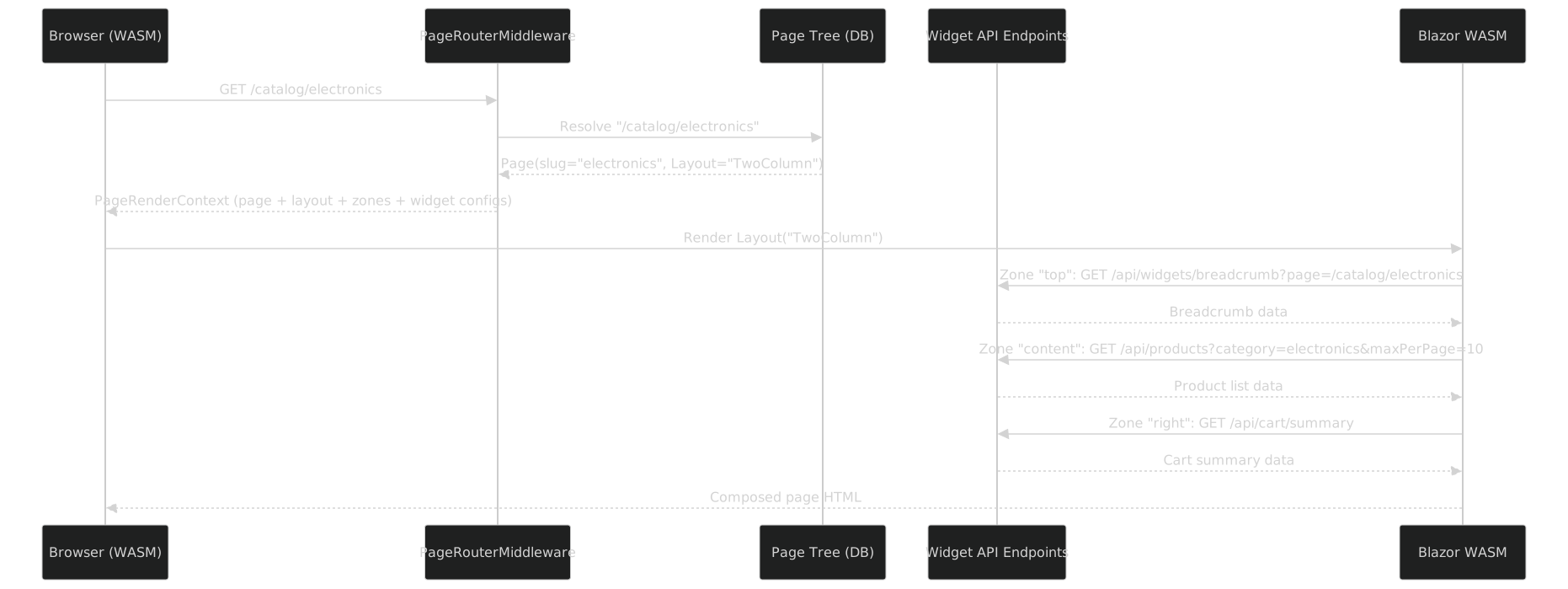
Each WidgetInstance in a Zone is deserialized from ConfigJson, matched to its [PageWidget] type, and rendered by the corresponding Blazor component. The shared kernel ensures widget components compile to both WASM (for the frontend SPA) and Server (for the admin page builder preview).
Cross-Cutting CMS Concerns and the Workflow DSL (M2)
Every production CMF needs cross-cutting content management concerns. Some are simple Content Parts; the publishing workflow is a full M2 DSL in itself.
The Workflow DSL -- Editorial Pipeline as a State Machine
Content publishing in a real organization is not a toggle between "draft" and "published." It is a multi-stage pipeline involving fact-checkers, translators, quality reviewers, and editors -- each with their own gates and approvals. The Workflow DSL models this as a compile-time state machine.
[MetaConcept("Workflow")]
[AttributeUsage(AttributeTargets.Class)]
public sealed class WorkflowAttribute : Attribute
{
    [MetaProperty("Name", Required = true)]
    public string Name { get; }

    public WorkflowAttribute(string name) => Name = name;
}

[MetaConcept("Stage")]
[AttributeUsage(AttributeTargets.Property)]
public sealed class StageAttribute : Attribute
{
    [MetaProperty("Name", Required = true)]
    public string Name { get; }

    [MetaProperty("Initial")]
    public bool Initial { get; set; }

    [MetaProperty("Terminal")]
    public bool Terminal { get; set; }

    public StageAttribute(string name) => Name = name;
}

[MetaConcept("Transition")]
[AttributeUsage(AttributeTargets.Class, AllowMultiple = true)]
public sealed class TransitionAttribute : Attribute
{
    [MetaProperty("From", Required = true)]
    public string From { get; }

    [MetaProperty("To", Required = true)]
    public string To { get; }

    [MetaProperty("Name")]
    public string? Name { get; set; }

    [MetaProperty("RequiresComment")]
    public bool RequiresComment { get; set; }

    public TransitionAttribute(string from, string to)
    {
        From = from;
        To = to;
    }
}

[MetaConcept("Gate")]
[AttributeUsage(AttributeTargets.Property, AllowMultiple = true)]
public sealed class GateAttribute : Attribute
{
    [MetaProperty("Name", Required = true)]
    public string Name { get; }

    [MetaProperty("Expression", Required = true)]
    public string Expression { get; }

    [MetaProperty("Message")]
    public string? Message { get; set; }

    public GateAttribute(string name, string expression)
    {
        Name = name;
        Expression = expression;
    }
}

[MetaConcept("RequiresRole")]
[AttributeUsage(AttributeTargets.Property)]
public sealed class RequiresRoleAttribute : Attribute
{
    [MetaProperty("Role", Required = true)]
    public string Role { get; }

    public RequiresRoleAttribute(string role) => Role = role;
}

[MetaConcept("ForEachLocale")]
[AttributeUsage(AttributeTargets.Property)]
public sealed class ForEachLocaleAttribute : Attribute { }

[MetaConcept("ScheduledTransition")]
[AttributeUsage(AttributeTargets.Property)]
public sealed class ScheduledTransitionAttribute : Attribute { }

[MetaConcept("HasWorkflow")]
[AttributeUsage(AttributeTargets.Class)]
public sealed class HasWorkflowAttribute : Attribute
{
    [MetaReference("Workflow", "Workflow", Multiplicity = Multiplicity.One)]
    public string Workflow { get; }

    public HasWorkflowAttribute(string workflow) => Workflow = workflow;
}
A complete editorial workflow:
[Workflow("Editorial")]
[Transition("Draft", "FactCheck")]
[Transition("FactCheck", "Translation")]
[Transition("Translation", "QualityReview")]
[Transition("QualityReview", "Published")]
[Transition("QualityReview", "Draft", Name = "Reject", RequiresComment = true)]
[Transition("Published", "Draft", Name = "Unpublish")]
public partial class EditorialWorkflow
{
    [Stage("Draft", Initial = true)]
    public partial WorkflowStage Draft { get; }

    [Stage("FactCheck")]
    [RequiresRole("FactChecker")]
    [Gate("AllSourcesCited", "Sources.Count > 0",
        Message = "All claims must cite sources")]
    public partial WorkflowStage FactCheck { get; }

    [Stage("Translation")]
    [RequiresRole("Translator")]
    [ForEachLocale] // runs independently per locale
    public partial WorkflowStage Translation { get; }

    [Stage("QualityReview")]
    [RequiresRole("Editor")]
    [Gate("SpellCheck", "SpellCheckScore == 100",
        Message = "Must pass spell check")]
    [Gate("SeoReady", "SeoScore >= 70",
        Message = "SEO score must be at least 70")]
    [Gate("AllLinksValid", "BrokenLinkCount == 0",
        Message = "All links must be valid")]
    public partial WorkflowStage QualityReview { get; }

    [Stage("Published", Terminal = true)]
    [ScheduledTransition] // can be scheduled for a future date
    public partial WorkflowStage Published { get; }
}

// Attach to a content type:
[AggregateRoot("Article", BoundedContext = "Content")]
[HasWorkflow("Editorial")]
[HasPart("Routable")]
[HasPart("Seoable")]
[HasPart("Versionable")]
public partial class Article
{
    [EntityId] public partial ArticleId Id { get; }
    [Property("Title", Required = true)] public partial string Title { get; }
    [StreamField("Body", StreamBlock = "PageContent")]
    public partial PageContentStream Body { get; }
}
The generator produces:
- State machine implementation -- sealed states, typed transitions, guard validation
- Transition guards -- check gates (quality expressions) and roles before allowing a transition
- Per-locale tracking -- for the Translation stage, a separate status per locale
- Scheduled publishing -- background job that transitions to Published at a configured datetime
- Audit trail -- who transitioned what, when, with what comment, creating a new revision each time
- Admin UI components -- workflow status badge, transition buttons, gate checklist, revision timeline

Versionable -- Content Versioning
A Content Part that adds revision tracking to any aggregate:
[ContentPart("Versionable")]
public partial class VersionablePart
{
    [PartField("RevisionNumber")] public partial int RevisionNumber { get; }
    [PartField("RevisionComment")] public partial string? RevisionComment { get; }
}
[HasPart("Versionable")] on an aggregate generates:
- A revision table:
ArticleRevisionwith a full snapshot of the aggregate at each save - A diff view: compare any two revisions
- A rollback command:
RollbackArticleCommandthat restores a previous revision - Integration with the Workflow DSL: every
[Transition]creates a new revision automatically
Localizable -- Multi-Language Content
[ContentPart("Localizable")]
public partial class LocalizablePart
{
    [PartField("Locale", Required = true)] public partial string Locale { get; }
}
[HasPart("Localizable")] generates:
- A per-locale content table:
Article_en,Article_fr,Article_de(or a single table with locale column, depending on configuration) - A locale resolver middleware: determines the current locale from URL, header, or cookie
- A fallback chain:
fr-FR → fr → en-- if content is not available in the requested locale, fall back gracefully - Integration with the Workflow DSL: the Translation stage tracks per-locale completion
Taxonomy -- Hierarchical Classification
A built-in aggregate with tree structure:
// Ships with Cmf.Content.Lib -- no user-defined DSL needed
[AggregateRoot("Taxonomy", BoundedContext = "Content")]
public partial class Taxonomy
{
    [EntityId] public partial TaxonomyId Id { get; }
    [Property("Name", Required = true)] public partial string Name { get; }
    [Property("Slug", Required = true)] public partial string Slug { get; }
    [Composition] public partial IReadOnlyList<TaxonomyNode> Nodes { get; }
}

[Entity("TaxonomyNode")]
public partial class TaxonomyNode
{
    [EntityId] public partial TaxonomyNodeId Id { get; }
    [Property("Label", Required = true)] public partial string Label { get; }
    [Property("Slug", Required = true)] public partial string Slug { get; }
    [Aggregation] public partial TaxonomyNode? Parent { get; }
    [Aggregation] public partial IReadOnlyList<TaxonomyNode> Children { get; }
}
Any content type with [HasPart("Taggable")] gets a many-to-many relationship with taxonomy nodes, enabling faceted navigation and classification.
Searchable -- Full-Text Search
[ContentPart("Searchable")]
public partial class SearchablePart { }

[MetaConcept("SearchField")]
[AttributeUsage(AttributeTargets.Property)]
public sealed class SearchFieldAttribute : Attribute
{
    [MetaProperty("Boost")]
    public float Boost { get; set; } = 1.0f;

    [MetaProperty("Analyzer")]
    public string? Analyzer { get; set; }
}
Usage:
[AggregateRoot("Product", BoundedContext = "Catalog")]
[HasPart("Searchable")]
public partial class Product
{
    [Property("Name", Required = true)]
    [SearchField(Boost = 2.0f)]
    public partial string Name { get; }

    [Property("Description")]
    [SearchField(Boost = 1.0f, Analyzer = "standard")]
    public partial string? Description { get; }
}
Generates: search index configuration, a SearchProductsQuery handler, and a search result DTO. The search backend is pluggable: Lucene.NET, Elasticsearch, or Azure Cognitive Search.
MediaRef -- Media Management
// MediaRef is a built-in value object shipped with Cmf.Content.Lib
[ValueObject("MediaRef")]
public partial class MediaRef
{
    [ValueComponent("AssetId", "Guid", Required = true)]
    public partial Guid AssetId { get; }

    [ValueComponent("Alt", "string")]
    public partial string? Alt { get; }

    [ValueComponent("Title", "string")]
    public partial string? Title { get; }
}
The CMF ships a built-in Media aggregate: asset library with image processing pipeline (resize, crop, format conversion), CDN URL generation, and responsive image srcset support. MediaRef is used in entity properties, block fields, and content part fields.
What Gets Generated (Stages 2+3)
From a single aggregate decorated with DDD, Content, Admin, and Page attributes, the source generator pipeline produces the entire application stack:

The DDD generator produces entity implementations with backing fields, strongly-typed IDs, and domain event support. The EF Core generator derives IEntityTypeConfiguration<T> from [Composition] semantics. The Admin generator produces Blazor components for list, form, and detail views. The Pages generator produces widget Blazor components and REST API controllers.
The generated CQRS handler wires together the aggregate, repository, and event bus — using the Builder pattern for entity construction and Result for typed error handling:
// <auto-generated/>
public sealed class CreateProductCommandHandler
    : ICommandHandler<CreateProductCommand, Result<Product>>
{
    private readonly IProductRepository _repository;

    public async Task<Result<Product>> HandleAsync(
        CreateProductCommand command, CancellationToken ct)
    {
        var product = new Product.Builder()
            .WithName(command.Name)
            .WithPrice(command.Price)
            .WithSlug(command.Slug)
            .Build();

        await _repository.SaveAsync(product, ct);
        return Result<Product>.Success(product);
    }
}
Cross-cutting generators also produce: sitemap.xml from the page tree, search index configuration for [HasPart("Searchable")] aggregates, and the workflow engine for [HasWorkflow] content types.
The Shared Kernel -- Blazor WASM + Server
The shared kernel compiles to both ASP.NET (server) and Blazor WebAssembly (browser), eliminating frontend-backend type drift.
| Layer | Shared Kernel | Server Only | Client Only |
|---|---|---|---|
| Types | DTOs, validation, enums | EF Core, repositories | Blazor rendering |
| Content | Block definitions, widget contracts | Command handlers, indexing | Page layout engine |
| Infrastructure | — | Background jobs, media processing | WASM interop |

CLI Tooling
The CMF ships a dotnet tool for scaffolding and orchestration:
$ cmf new MyStore
  Created MyStore.sln with 7 projects (Lib, Abstractions, Infrastructure.Postgres,
  Server, Client, Shared, Lib.Testing)

$ cmf add bounded-context Catalog
$ cmf add aggregate Product --context Catalog
  Created Product.cs + Commands + Events

$ cmf add admin-module Products --aggregate Product
$ cmf add widget ProductList --aggregate Product --display List

$ cmf generate
  Building MyStore.Lib... Generated 34 files. Build succeeded.

$ cmf migrate
  Generated migration: 20260319_InitialCatalog
Complete Example -- E-Commerce
Three bounded contexts, multiple aggregates, content parts, blocks, widgets, and a workflow:
// ── Catalog Context ──
[AggregateRoot("Product", BoundedContext = "Catalog")]
[HasPart("Routable")][HasPart("Seoable")][HasPart("Taggable")]
[HasPart("Searchable")][HasWorkflow("Editorial")]
public partial class Product
{
    [EntityId] public partial ProductId Id { get; }
    [Property("Name", Required = true)][SearchField(Boost = 2.0f)]
    public partial string Name { get; }
    [Property("Sku", Required = true)] public partial string Sku { get; }
    [Composition] public partial Money Price { get; }
    [StreamField("Details", StreamBlock = "ProductContent")]
    public partial ProductContentStream Details { get; }
    [Composition] public partial IReadOnlyList<ProductVariant> Variants { get; }
    [Association] public partial CategoryId CategoryId { get; }
}

// ── Ordering Context ──
[AggregateRoot("Order", BoundedContext = "Ordering")]
public partial class Order
{
    [EntityId] public partial OrderId Id { get; }
    [Property("Status", Required = true)] public partial OrderStatus Status { get; }
    [Composition] public partial IReadOnlyList<OrderLine> Lines { get; }
    [Composition] public partial ShippingAddress ShippingAddress { get; }
    [Association] public partial CustomerId CustomerId { get; }
}

// ── Shipping Context ──
[AggregateRoot("Shipment", BoundedContext = "Shipping")]
public partial class Shipment
{
    [EntityId] public partial ShipmentId Id { get; }
    [Association] public partial OrderId OrderId { get; }
    [Composition] public partial TrackingNumber TrackingNumber { get; }
}
Page widgets and admin modules:
[PageWidget("ProductList", Module = "Product", DisplayType = DisplayType.List)]
public partial class ProductListWidget
{
    [WidgetFilter("Category")] public partial CategoryId? CategoryFilter { get; }
    [WidgetConfig("MaxPerPage", DefaultValue = 12)] public partial int MaxPerPage { get; }
}

[PageWidget("ProductShow", Module = "Product",
    DisplayType = DisplayType.Show, HasPage = true)]
public partial class ProductShowWidget { }

[AdminModule("Products", Aggregate = "Product", Icon = "package", MenuGroup = "Catalog")]
[AdminAction("Publish", Command = "PublishProduct")]
public partial class ProductAdminModule { }
Runtime page tree built by a content editor:
/ (Home)                              Layout: FullWidth
├── /catalog                          Layout: TwoColumn
│   ├── Zone "content": [ProductList(MaxPerPage=12)]
│   └── Zone "sidebar": [CategoryNav]
├── /catalog/electronics              Layout: TwoColumn  ← bound to Category
│   └── Zone "content": [ProductList(CategoryFilter=electronics)]
├── /catalog/electronics/laptop-x1    Layout: ProductDetail  ← bound to Product
│   └── Zone "content": [ProductShow]
└── /about                            Layout: FullWidth
    └── Zone "content": [StreamField(PageContent)]
The Requirements/Feature Tracking DSL
The sixth M2 DSL bridges the gap between business requirements and implementation. It provides typed requirement references in code, hierarchical feature tracking, lambda-based acceptance criteria validation, and automatic tracing that maps features to code, tests, and API documentation.
Entities: From Epic to Implementation
The Requirements DSL models a complete feature hierarchy:
Epic (high-level initiative, e.g., "Multi-Tenant Support")
├── Feature (deliverable behavior, e.g., "Tenant isolation")
│   ├── Story (user-facing work, e.g., "Implement tenant-scoped query filtering")
│   │   └── Task (implementer's work, e.g., "Add TenantId to DbContext queries")
└── Bug (defect, e.g., "Queries leak data across tenants")
    └── (optional) Story/Task (fixes for the bug)
Each entity tracks:
- Lifecycle state: Draft → Proposed → Approved → InProgress → Quality → Translation → Review → Done
- Acceptance criteria: Behavioral tests in natural language
- Validation lambdas: Executable acceptance criteria (source-generated validators)
- Test coverage: Which tests validate which requirements
- Implementation mapping: Which classes/methods implement which requirements
Example: Defining a Feature with Acceptance Criteria
[Feature(
    Id = "FEATURE-156",
    Title = "User role-based access control",
    ParentEpics = new[] { "EPIC-42" },
    Priority = RequirementPriority.Critical,
    Owner = "auth-team",
    AcceptanceCriteria = new[] {
        "Admins can assign roles to users",
        "Viewers can only read content",
        "Role changes take effect immediately after logout/login",
        "Roles are audited in the system log"
    },
    ValidationLambdas = new[] {
        "(user) => user.Roles.Count > 0 ? Result.Success() : Result.Failure(\"User must have at least one role\")",
        "(user) => user.Roles.All(r => r.IsActive) ? Result.Success() : Result.Failure(\"User has inactive roles\")"
    },
    EstimatedPoints = 5
)]
public partial class RoleAssignmentFeature { }
The generator produces:
- Constants:
Requirements.FEATURE_156 = "FEATURE-156"(type-safe reference) - Validators:
RoleAssignmentValidator : IRequirementValidator<User>(source-generated) - Metadata: Serializable feature hierarchy and state machine
Implementing Requirements in Domain Code
Domain code decorates classes and methods with [Implements] to map implementation to requirements:
[Implements(Requirements.FEATURE_156)]
[Implements("EPIC-42")] // References parent epic too
public class RoleAssignmentService
{
    [Implements("FEATURE-156.AC.1")] // Specific acceptance criterion
    public async Task AssignRoleAsync(User user, Role role)
    {
        // Implementation details
    }

    public async Task<Result<User, InvalidOperationException>> OnLoginAsync(User user)
    {
        // Validate user roles against acceptance criteria
        var validator = new RoleAssignmentValidator();
        var result = validator.Validate(user);
        if (!result.IsSuccess)
            return Result<User, InvalidOperationException>.Failure(
                new InvalidOperationException(result.FailureMessage));

        // Implementation continues...
    }
}
Four Forms of Tracing
The Requirements DSL automatically generates four tracing outputs:
1. Code Comment Generation
/// <summary>
/// Implements:
///   - FEATURE-156: User role-based access control (AC.1, AC.2)
///   - EPIC-42: Enterprise platform capabilities
///
/// Acceptance Criteria:
///   AC.1: Admins can assign roles to users
///   AC.2: Viewers can only read content
/// </summary>
public async Task AssignRoleAsync(User user, Role role) { }
IDE tooltips and generated API documentation now show requirement context.
2. Runtime Audit Trail
An IRequirementAuditLog interceptor logs method execution with requirement context:
// Internal logging (DI-injected)
await _auditLog.LogImplementationAsync(
    requirementId: "FEATURE-156",
    typeName: "RoleAssignmentService",
    methodName: "AssignRoleAsync",
    parameters: new { user = "alice@example.com", role = "Admin" },
    result: successOrError,
    executionTimeMs: 42,
    occurredAt: DateTime.UtcNow
);
Enables post-mortems: "Which code changed satisfied requirement XYZ?" and "How many times did this requirement execute in production today?"
3. Test Coverage Report
[TestFor("FEATURE-156")]
[TestFor("FEATURE-156.AC.1")]
public class RoleAssignmentTests
{
    [Fact]
    public async Task AdminCanAssignRoleToUser()
    {
        // Test implementation
    }

    [Fact]
    public async Task ViewerRoleCannotModifyContent()
    {
        // Test implementation
    }
}
The generator produces RequirementTestCoverage mapping:
FEATURE-156 → [RoleAssignmentTests.AdminCanAssignRoleToUser, RoleAssignmentTests.ViewerRoleCannotModifyContent]
FEATURE-156.AC.1 → [RoleAssignmentTests.AdminCanAssignRoleToUser]
CI can fail if coverage drops below thresholds.
4. API Documentation
OpenAPI/GraphQL schemas are auto-decorated:
[OpenApiOperation(
    Summary = "Assign a role to a user",
    Description = "Implements FEATURE-156: User role-based access control (AC.1)"
)]
public ActionResult AssignRole([FromBody] AssignRoleRequest request) { }
Swagger/GraphQL docs show which APIs implement which features.
Lifecycle State Machine
All requirements follow a strict state machine:
Draft ──→ Proposed ──→ Approved ──→ InProgress
             │            │           │
             └──── Rejected           ├──→ Quality ──→ Translation ──→ Review ──→ Done
                                     │                               │
                                     └────────── Blocked ────────────┘
Source-generated RequirementLifecycleStateMachine enforces valid transitions and prevents invalid state changes (e.g., jumping from Draft to Done).
Integration with DDD and Testing
Requirements validators integrate seamlessly with domain aggregates:
[AggregateRoot]
public class User
{
    public async Task<Result<User, DomainException>> AssignRoleAsync(Role role)
    {
        // Inject the validator
        var validator = ServiceProvider.GetRequiredService<IRequirementValidator<User>>();
        var result = validator.Validate(this);

        if (!result.IsSuccess)
            return Result<User, DomainException>.Failure(
                new DomainException(result.FailureMessage));

        // Apply domain changes
        _roles.Add(role);
        _events.Add(new RoleAssignedEvent(Id, role));
        return Result<User, DomainException>.Success(this);
    }
}
Unit tests can validate requirements independently:
[TestFor("FEATURE-156.AC.3")]
public void RoleChangeTakesEffectAfterRelogin()
{
    // Arrange
    var user = new User("alice");
    user.AssignRole(Role.Admin);

    // Act & Assert
    var validator = new RoleAssignmentValidator();
    var result = validator.Validate(user);
    result.IsPassed.Should().BeTrue();
}
Constant Registry for Type Safety
All requirements are exposed as const strings, preventing typos:
public static class Requirements
{
    public const string EPIC_MULTI_TENANT = "EPIC-123";
    public const string EPIC_ENTERPRISE = "EPIC-42";
    public const string FEATURE_AUTH = "FEATURE-156";
    public const string STORY_JWT = "STORY-789";
    public const string TASK_VALIDATOR = "TASK-201";
    public const string BUG_DATA_LEAK = "BUG-999";
}

// Usage in code
[Implements(Requirements.FEATURE_AUTH)] // Type-safe, autocomplete support
public class RoleService { }
Coverage Analysis
The IRequirementCoverageAnalyzer service provides analytics:
var coverage = await _analyzer.GetCoverageReportAsync();

Console.WriteLine($"Total requirements: {coverage.TotalRequirements}");
Console.WriteLine($"Implemented: {coverage.ImplementationPercentage}%");
Console.WriteLine($"Tested: {coverage.TestCoveragePercentage}%");
Console.WriteLine($"Fully covered: {coverage.FullyCoveredCount}");
Reports identify:
- Unimplemented requirements (no
[Implements]found) - Untested requirements (no
[TestFor]found) - Orphaned tests (tests with no corresponding requirement)
External Integration
The IRequirementRegistry outputs serializable metadata, enabling:
- Jira sync: Automatically update Jira issues with code locations
- Test frameworks: Get requirements for TDD/BDD frameworks
- Observability: Publish requirement traces to APM systems
- Markdown reports: Generate traceability matrices for stakeholders
The CMF Landscape -- Standing on Giants
| Origin | Pattern Adopted | What Changed |
|---|---|---|
| Diem (Symfony 1.4, 2010) | Two-DSL approach, Page/Zone/Widget, "starts empty" | PHP → C#, YAML → attributes, runtime → compile-time |
| Wagtail (Django) | StreamField, typed content blocks as JSON | Python → C#, runtime blocks → compiled block types |
| Orchard Core (.NET) | Content Parts as composable mixins | Runtime composition → compile-time [HasPart] |
| Drupal | Content versioning, editorial workflows, taxonomy | PHP hooks → Workflow DSL with typed state machines |
| Symfony CMF | Dynamic routing from content tree | PHPCR → EF Core page tree with materialized paths |
| Strapi | Auto REST + GraphQL from schema | Node.js → Roslyn source generators |
What this CMF adds beyond all of them: DDD as a first-class concern (bounded contexts, aggregates, sagas, CQRS), an M3 meta-metamodel making all DSLs self-describing, and type safety across the full stack via the shared C# kernel.
Summary
| Layer | What It Defines | Who Writes It |
|---|---|---|
| M3 | Primitives for building DSLs | Framework authors (once) |
| M2 | Six CMF DSLs (DDD, Content, Admin, Pages, Workflow, Requirements) | DSL authors |
| M1 | Domain models using the DSLs | Application developers |
| M0 | Runtime instances | The program at runtime |
This article and Modeling, Metamodeling, and Meta-Metamodeling in C# form a pair. The first establishes the theory -- M3, attributes as DSL surfaces, multi-staged Roslyn generators. This article demonstrates the application -- a Content Management Framework that turns decorated classes into a full-stack DDD application with pages, workflows, and a shared Blazor WebAssembly kernel. The Diem project started this journey in PHP in 2010. The meta-metamodel completes it in C# in 2026.