BinaryWrapper: Type-Safe .NET Wrappers for CLI Binaries
Point it at a binary, scrape its
--help, and get a fully typed C# API — with IntelliSense, version guards, and structured output parsing. No more string-building, no more flag typos, no more parsing stdout by hand.
The Problem
Calling CLI tools from .NET is painful. You end up concatenating argument strings, hoping you spelled --recursive right (was it --recurse?), and parsing raw stdout with regex. It works — until someone upgrades the binary and a flag silently changes behavior, or a new subcommand appears that your code doesn't know about.
I've orchestrated enough infrastructure tooling — Packer, Vagrant, Docker, Podman — to know that this approach doesn't scale. Every binary has its own help format, its own flag conventions, its own versioning quirks. The dream was simple: what if the compiler could catch CLI mistakes the same way it catches type errors?
The Idea
BinaryWrapper turns any CLI binary into a typed C# API through a three-phase pipeline:

Design time scrapes help text from the binary (locally or inside containers) and serializes the command tree to JSON — one file per version. Build time feeds those JSON files to a Roslyn incremental source generator that merges versions, computes [SinceVersion]/[UntilVersion] annotations, and emits sealed command classes, fluent builders, and a typed client. Runtime resolves binaries, builds commands through the generated API, executes processes, and parses output into typed domain events.
The result: zero runtime reflection, full IntelliSense, compile-time safety, and multi-version awareness — all from a single [BinaryWrapper("packer")] attribute.
What It Looks Like
1. Scrape the binary
await new DesignPipelineRunner
{
    VersionCollector = new GitHubReleasesVersionCollector("hashicorp", "packer"),
    Pipeline = new DesignPipeline()
        .UseImageBuild("packer-scrape", "alpine:3.19",
            v => $"apk add curl && curl -fsSL .../packer_{v}_linux_amd64.zip | unzip ...")
        .UseContainer()
        .UseScraper("packer", HelpParsers.Create("packer"))
        .Build(),
    OutputDir = "scrape/"
}.RunAsync(args);
This produces versioned JSON files: packer-1.9.0.json, packer-1.10.0.json, packer-1.11.2.json, each containing the full command tree for that version.
How the Design Pipeline Actually Works
The pipeline uses channel-based parallelism: versions are fed into an unbounded channel, and worker tasks consume them concurrently. Each version goes through a middleware chain — build an image, start a container, scrape every --help recursively, save JSON, clean up.
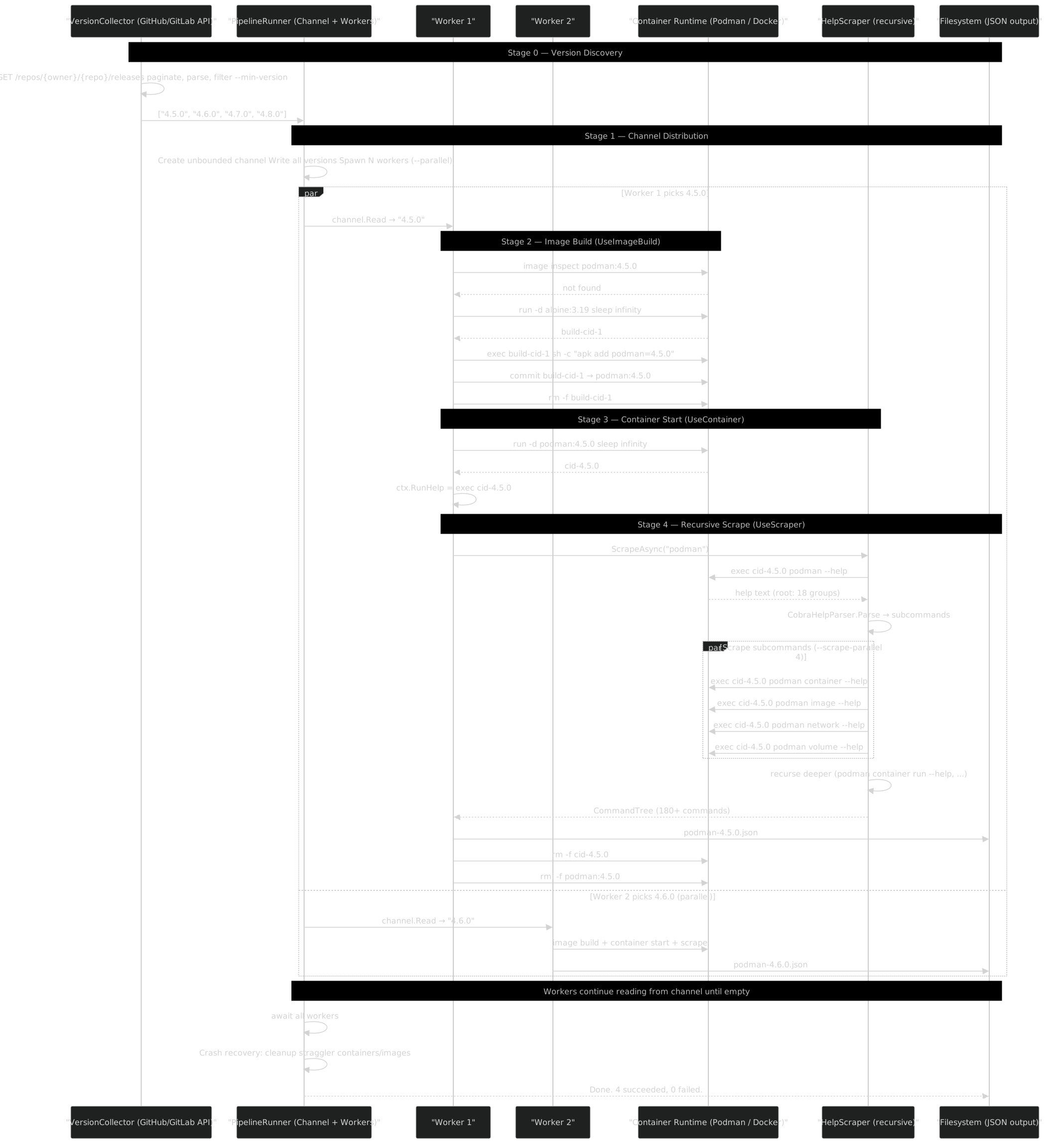
The middleware chain is composable — each Use* method wraps the next stage, runs its setup, calls next(ctx), then cleans up in a finally block. This guarantees container/image cleanup even on failures.
Example: Podman — Container-Based Multi-Version Scrape
Podman has 58 versions, 180+ commands, and 18 command groups. Scraping it means building 58 Alpine containers, each with a specific Podman version installed, and running --help recursively on every command in every version:
await new DesignPipelineRunner
{
    VersionCollector = new GitHubReleasesVersionCollector("containers", "podman"),
    RuntimeBinary = "podman",  // Use Podman to build Podman containers (inception!)
    Pipeline = new DesignPipeline()
        .UseImageBuild("podman-scrape", "alpine:3.19",
            v => $"apk add --no-cache podman~={v}")
        .UseContainer()
        .UseScraper("podman", HelpParsers.Cobra())
        .Build(),
    OutputDir = "scrape/podman/",
    DefaultParallelism = 4,        // 4 versions built/scraped in parallel
    DefaultScrapeParallelism = 4,  // 4 subcommands scraped concurrently per version
}.RunAsync(["--min-version", "4.0.0", "--missing", "--dashboard"]);
The --missing flag skips versions that already have a JSON file, so you can resume interrupted runs. The --dashboard flag shows a live progress table:
┌──────────┬───────────┬──────────┬─────────┐
│ Version  │ Stage     │ Commands │ Elapsed │
├──────────┼───────────┼──────────┼─────────┤
│ 4.5.0    │ Scraping  │ 142 cmds │ 18.3s   │
│ 4.6.0    │ Building  │ -        │ 5.1s    │
│ 4.7.0    │ Done      │ 183 cmds │ 24.9s   │
│ 4.8.0    │ Pending   │ -        │ -       │
└──────────┴───────────┴──────────┴─────────┘
Example: Docker Compose — Channel-Based GitHub Scrape
Docker Compose V2 uses a different approach: versions are collected from GitHub releases by channel (stable, beta), and the install script downloads pre-built binaries:
await new DesignPipelineRunner
{
    VersionCollector = new GitHubReleasesVersionCollector("docker", "compose",
        tagToVersion: tag => tag.TrimStart('v')),
    RuntimeBinary = "podman",
    Pipeline = new DesignPipeline()
        .UseImageBuild("compose-scrape", "alpine:3.19",
            v => $"curl -fsSL https://github.com/docker/compose/releases/download/v{v}/" +
                 $"docker-compose-linux-x86_64 -o /usr/local/bin/docker-compose && " +
                 $"chmod +x /usr/local/bin/docker-compose")
        .UseContainer()
        .UseScraper("docker-compose", HelpParsers.Cobra())
        .Build(),
    OutputDir = "scrape/docker-compose/",
}.RunAsync(["--min-version", "2.0.0"]);
Example: Packer — Inline Container Setup
For binaries that aren't pre-installed in a base image, UseInlineContainer lets you define the download and install steps inline. The pipeline builds a temporary container image per version, runs --help, and caches the raw output to disk:
await new DesignPipelineRunner
{
    VersionCollector = new GitHubReleasesVersionCollector("hashicorp", "packer"),
    Pipeline = new DesignPipeline()
        .UseInlineContainer("packer-scrape", "alpine:3.19",
            v => $"apk add --no-cache curl unzip && " +
                 $"curl -fsSL https://releases.hashicorp.com/packer/{v}/" +
                 $"packer_{v}_linux_amd64.zip -o /tmp/p.zip && " +
                 $"unzip /tmp/p.zip -d /usr/local/bin/")
        .UseContainer()
        .UseScraper("packer", HelpParsers.Create("packer"))
        .Build(),
    OutputDir = "scrape/packer/",
}.RunAsync(args);
Reparse Mode — Iterate Without Re-Scraping
The first scrape run dumps raw --help output into help/ subdirectories. When you improve the parser, you don't need to re-download or re-run containers — the --reparse flag re-processes the cached help text and regenerates JSON locally:
await new DesignPipelineRunner
{
    VersionCollector = new GitHubReleasesVersionCollector("hashicorp", "packer"),
    ReparsePipeline = new DesignPipeline()
        .UseCachedHelp()
        .UseScraper("packer", HelpParsers.Create("packer"))
        .Build(),
    Pipeline = /* full pipeline for first run */,
    OutputDir = "scrape/packer/",
}.RunAsync(["--reparse"]);
UseCachedHelp() replaces the container stages entirely — no network, no containers, just disk reads and parser logic.
2. Declare a descriptor
[BinaryWrapper("packer", FlagPrefix = "-", FlagValueSeparator = "=", UseBoolEqualsFormat = true)]
public partial class PackerDescriptor;
That's it. The source generator picks up the JSON files, merges them, and emits everything you need.
3. Use the generated API
var binding = new BinaryBinding(
    new BinaryIdentifier("packer"),
    executablePath: "/usr/bin/packer",
    detectedVersion: SemanticVersion.Parse("1.11.2"));

var client = Packer.Create(binding);

// Full IntelliSense — every flag is a typed property
var cmd = client.Build(b => b
    .WithForce(true)
    .WithParallelBuilds(4)
    .WithVar(["region=us-east-1", "instance_type=t2.micro"])
    .WithTemplate("template.pkr.hcl"));

// Execute and stream typed events
var executor = new CommandExecutor(new SystemProcessRunner());
await foreach (var evt in executor.StreamAsync(binding, cmd, myParser, ct))
{
    switch (evt)
    {
        case BuildStarted s: logger.Info($"Building {s.Name}...");
        case BuildCompleted c: logger.Info($"Artifact: {c.Path}");
        case BuildFailed f: logger.Error($"Failed: {f.Error}");
    }
}
If you try .WithIgnorePreReleasePlugins(true) against Packer 1.9.0, the builder throws OptionNotSupportedException at runtime — because that flag was introduced in 1.11.0 and the generator knows it.
Multi-Version Intelligence
This is where BinaryWrapper really shines. When you provide JSON files from multiple versions, VersionDiffer doesn't just pick the latest — it merges all trees and computes exactly when each command and option appeared or disappeared:

The generated builders inject VersionGuard checks. If the runtime-detected binary version falls outside the annotated range, you get a clear exception — not a silent unknown flag error buried in stderr.
This means a single compiled library supports every version of the binary. No #if directives, no version-switching boilerplate. The version constraints are data, not code.
Help Parsing: Five Formats and Counting
CLI tools don't agree on how to format --help output. BinaryWrapper ships pluggable parsers for the most common frameworks:
| Parser | Framework | Used By |
|---|---|---|
StandardHelpParser |
GNU-style (Options:, Commands:) |
Generic CLIs |
CobraHelpParser |
Go/cobra (Available Commands:, Flags:) |
Docker, Podman |
ArgparseHelpParser |
Python argparse ({cmd1,cmd2}, options:) |
PodmanCompose |
PackerHelpParser |
HashiCorp custom format | Packer |
VagrantHelpParser |
Ruby custom (Common commands:) |
Vagrant |
Each parser implements IHelpParser and knows how to extract command names, option names (long and short), value kinds (flag, single, multiple), CLR types, and descriptions from the raw help text. Adding a new parser for an unsupported format is straightforward — implement the interface, plug it into the pipeline.
The Design Pipeline
Scraping isn't always as simple as running binary --help. Some tools need to be installed in containers, some have subcommands that only appear in certain versions, some crash on edge cases. The design pipeline handles all of this through composable middleware:
new DesignPipeline()
    .UseImageBuild("vagrant-scrape", "ubuntu:22.04",
        v => $"apt-get install -y vagrant={v} && vagrant plugin install ...")
    .UseContainer()
    .UseScraper("vagrant", HelpParsers.Create("vagrant"), helpFlag: "--help")
    .Build()
Each middleware step — image building, container lifecycle, scraping — is a function with try/finally cleanup semantics. The pipeline runner orchestrates multi-version processing through Channel<T> workers, scraping versions in parallel while respecting rate limits.
For debugging, there's a --reparse mode that re-runs parsers against cached help text without re-scraping — invaluable when refining a parser against a tricky help format.
Event-Driven Output Parsing
Raw stdout is useful for humans. Code needs structure. BinaryWrapper's output pipeline transforms process output into typed domain events:
IProcessRunner → OutputLine[] → IOutputParser<TEvent> → IResultCollector<TEvent, TResult>IOutputParser<TEvent>receives each line (tagged as stdout or stderr) and yields zero or more typed eventsIResultCollector<TEvent, TResult>accumulates events into a final result objectCommandExecution<TEvent>offers dual consumption:IAsyncEnumerable<TEvent>for streaming, or.ExecuteAsync()for collected results
This separation means you can reuse the same parser across different consumption patterns — stream events to a UI while simultaneously collecting a summary result.
Architecture at a Glance
BinaryWrapper/
├── src/
│   ├── FrenchExDev.Net.BinaryWrapper/                 Core runtime
│   │   └── Code.cs                                    All types in one file: BinaryIdentifier,
│   │                                                  BinaryBinding, SemanticVersion,
│   │                                                  CommandExecutor, VersionGuard, ...
│   ├── FrenchExDev.Net.BinaryWrapper.Attributes/      [BinaryWrapper] attribute (netstandard2.0)
│   ├── FrenchExDev.Net.BinaryWrapper.SourceGenerator/  Roslyn incremental generator
│   │   ├── BinaryWrapperGenerator.cs                  Entry point: finds descriptors, matches JSON
│   │   ├── VersionDiffer.cs                           Multi-version tree merging
│   │   ├── CommandClassEmitter.cs                     Emits ICliCommand implementations
│   │   ├── BuilderClassEmitter.cs                     Emits [fluent builders](#content/blog/builder-pattern.md) with version guards
│   │   └── ClientClassEmitter.cs                      Emits typed client with nested groups
│   ├── FrenchExDev.Net.BinaryWrapper.Design/          Command tree data model + help parsers
│   ├── FrenchExDev.Net.BinaryWrapper.Design.Lib/      Pipeline runner + middleware
│   └── FrenchExDev.Net.BinaryWrapper.Testing/         FakeProcessRunner, CsCheck generators
└── test/                                              400+ tests across 4 test projects
Key Design Decisions
- JSON as intermediate format — decouples scraping from generation. Parsers can be refined independently, and re-parsing cached help text is instant.
- Incremental source generator — only regenerates when JSON files or descriptors change. No build-time penalty for large command trees.
- Leaf commands only — the generator produces classes for terminal commands (e.g.,
docker container run), not intermediate groups. Groups are handled structurally through nested client classes. - Version constraints are runtime, not compile-time — a single build supports all versions. The generated code adapts to whatever version is detected at startup.
- Test helpers over mocks —
FakeProcessRunner,TestBindings, and CsCheck property-based generators replace fragile mock setups.
Production Consumers
BinaryWrapper currently powers typed wrappers for seven CLI binaries:
| Binary | Parser | Versions | Notes |
|---|---|---|---|
| Docker | CobraHelpParser | 20+ versions via GitHub tags | Container lifecycle, image management |
| Docker Compose | CobraHelpParser | GitHub releases | Multi-container orchestration + schema bundle |
| Podman | CobraHelpParser | GitHub releases | Docker-compatible, rootless |
| Podman Compose | ArgparseHelpParser | GitHub releases | Python argparse format |
| Packer | PackerHelpParser | HashiCorp releases | Image building, HCL templates |
| Vagrant | VagrantHelpParser | Custom collector | VM lifecycle, custom help format |
| GitLab CLI | GlabHelpParser | GitLab API discovery | GitLab CLI, custom Cobra template |
Each consumer demonstrates different aspects: custom parsers, typed event hierarchies, result collectors, version-specific edge cases, and container-based scraping strategies.
Why This Matters
BinaryWrapper exists because the gap between "call a CLI" and "integrate a CLI" is enormous. String concatenation gets you from A to B. But when you need IntelliSense for 200 flags, version-aware guards across 20 releases, and typed events streaming from process output — you need a framework that treats CLI binaries as first-class APIs.
The three-phase design (scrape → generate → execute) means each concern evolves independently. Parsers improve without touching generated code. New versions are supported by running the scraper once. Output parsing is pluggable per consumer. And the developer using the generated API never sees any of this machinery — they just get autocomplete and type safety.
BinaryWrapper is part of the FrenchExDev.Net ecosystem. Built with Roslyn source generators, async streams, Result-based error handling, and a healthy dislike of Process.Start() with hand-crafted argument strings.