Part VII: Pages DSL -- Dynamic Composition
Overview
The Pages DSL is fundamentally different from the other DSLs. The DDD, Content, Admin, and Workflow DSLs generate code at compile time from attributes. The Pages DSL defines a runtime composition layer -- a page tree stored in the database, managed by content editors through the admin interface, and rendered as a Blazor WebAssembly single-page application.
The only compile-time artifact is the PageWidget. A [PageWidget] attribute on a class declares a Blazor component that can be placed in zones on pages at runtime. Everything else -- pages, layouts, zones, widget placement, URL routing -- is runtime data, not generated code.
This mirrors the original Diem architecture (Part I): pages are composed from layouts, layouts have zones, and widgets are placed in zones. The difference is that Diem rendered server-side PHP, while the CMF renders client-side Blazor WASM calling APIs.
Runtime Entities
The page tree is built from four entity types that live in the database, not in source-generated code. They are part of the CMF framework itself, not generated per-application.
Page
namespace Cmf.Pages.Lib.Entities;

/// <summary>
/// A node in the hierarchical page tree. Pages have slugs, form
/// parent-child relationships, and are assigned a layout. Pages
/// are runtime entities managed by content editors, not source-generated.
/// </summary>
public class Page
{
    public PageId Id { get; set; }
    public string Title { get; set; } = "";
    public string Slug { get; set; } = "";
    public string MaterializedPath { get; set; } = "";
    public PageId? ParentId { get; set; }
    public LayoutId LayoutId { get; set; }
    public int SortOrder { get; set; }
    public bool IsPublished { get; set; }
    public string? MetaTitle { get; set; }
    public string? MetaDescription { get; set; }
    public string? CanonicalUrl { get; set; }

    // Navigation properties
    public Page? Parent { get; set; }
    public ICollection<Page> Children { get; set; } = new List<Page>();
    public Layout Layout { get; set; } = default!;
    public ICollection<WidgetInstance> WidgetInstances { get; set; } = new List<WidgetInstance>();
}
Layout
/// <summary>
/// A named layout template that defines the visual structure of a page.
/// Layouts contain named zones where widgets are placed. Content editors
/// assign layouts to pages via the admin interface.
/// </summary>
public class Layout
{
    public LayoutId Id { get; set; }
    public string Name { get; set; } = "";
    public string? Description { get; set; }
    public string TemplateComponent { get; set; } = "";

    public ICollection<Zone> Zones { get; set; } = new List<Zone>();
}
Zone
/// <summary>
/// A named region within a layout where widgets are placed.
/// Zones are defined per-layout and identified by name (e.g., "Header",
/// "MainContent", "Sidebar", "Footer").
/// </summary>
public class Zone
{
    public ZoneId Id { get; set; }
    public LayoutId LayoutId { get; set; }
    public string Name { get; set; } = "";
    public int MaxWidgets { get; set; } = 10;

    public Layout Layout { get; set; } = default!;
}
WidgetInstance
/// <summary>
/// A runtime placement of a widget in a zone on a specific page.
/// The widget type identifies the Blazor component. The configuration
/// is a JSON object with widget-specific settings.
/// </summary>
public class WidgetInstance
{
    public WidgetInstanceId Id { get; set; }
    public PageId PageId { get; set; }
    public ZoneId ZoneId { get; set; }
    public string WidgetType { get; set; } = "";
    public int SortOrder { get; set; }
    public string ConfigurationJson { get; set; } = "{}";

    public Page Page { get; set; } = default!;
    public Zone Zone { get; set; } = default!;
}
Page Hierarchy

PageWidget: The Compile-Time Attribute
While pages, layouts, zones, and widget instances are runtime data, widgets themselves are Blazor components defined at compile time. The [PageWidget] attribute declares a class as a placeable widget and registers it in the widget catalog.
The PageWidget Attribute
namespace Cmf.Pages.Lib;

/// <summary>
/// Declares a Blazor component as a page widget that can be placed
/// in zones by content editors. The generator registers the widget
/// in the widget catalog and produces the admin configuration form.
/// </summary>
[MetaConcept("PageWidget")]
[MetaConstraint("MustHaveModule",
    "Module != null && Module.Length > 0",
    Message = "PageWidget must specify a Module")]
public sealed class PageWidgetAttribute : Attribute
{
    [MetaProperty("Name", "string", Required = true)]
    public string Name { get; }

    [MetaProperty("Module", "string", Required = true)]
    public string Module { get; set; }

    [MetaProperty("Description", "string")]
    public string? Description { get; set; }

    [MetaProperty("Icon", "string")]
    public string? Icon { get; set; }

    public PageWidgetAttribute(string name) => Name = name;
}
WidgetConfig
/// <summary>
/// Declares a configuration property on a page widget. Configuration
/// values are stored as JSON in the WidgetInstance and edited by
/// content editors in the admin interface.
/// </summary>
[MetaConcept("WidgetConfig")]
[AttributeUsage(AttributeTargets.Property, AllowMultiple = false)]
public sealed class WidgetConfigAttribute : Attribute
{
    [MetaProperty("DisplayName", "string")]
    public string? DisplayName { get; set; }

    [MetaProperty("HelpText", "string")]
    public string? HelpText { get; set; }

    [MetaProperty("Required", "bool")]
    public bool Required { get; set; } = false;

    [MetaProperty("DefaultValue", "string")]
    public string? DefaultValue { get; set; }
}
Example Widgets
ProductListWidget
namespace MyStore.Client.Widgets;

/// <summary>
/// Displays a paginated, filterable product grid.
/// Configuration allows editors to select a category and page size.
/// </summary>
[PageWidget("ProductList", Module = "Product",
    Description = "Paginated product grid with category filter",
    Icon = "grid")]
public partial class ProductListWidget : ComponentBase
{
    [WidgetConfig(DisplayName = "Category", HelpText = "Filter by product category")]
    public string? Category { get; set; }

    [WidgetConfig(DisplayName = "Page Size", DefaultValue = "12",
        HelpText = "Number of products per page")]
    public int PageSize { get; set; } = 12;

    [WidgetConfig(DisplayName = "Show Prices")]
    public bool ShowPrices { get; set; } = true;

    [WidgetConfig(DisplayName = "Sort By", DefaultValue = "Name")]
    public string SortBy { get; set; } = "Name";

    [Inject] private IProductApiClient ProductApi { get; set; } = default!;

    private List<ProductApiDto> Products { get; set; } = new();
    private int TotalCount { get; set; }
    private int CurrentPage { get; set; } = 1;

    protected override async Task OnInitializedAsync()
        => await LoadProducts();

    private async Task LoadProducts()
    {
        var result = await ProductApi.GetPagedAsync(
            CurrentPage, PageSize, Category, SortBy);
        Products = result.Items.ToList();
        TotalCount = result.TotalCount;
    }
}
ProductShowWidget
/// <summary>
/// Displays a single product's details. Typically placed on a
/// bound entity page (page bound to a Product via RoutablePart slug).
/// </summary>
[PageWidget("ProductShow", Module = "Product",
    Description = "Single product detail view",
    Icon = "package")]
public partial class ProductShowWidget : ComponentBase
{
    [WidgetConfig(DisplayName = "Show Gallery")]
    public bool ShowGallery { get; set; } = true;

    [WidgetConfig(DisplayName = "Show Related Products")]
    public bool ShowRelated { get; set; } = true;

    [WidgetConfig(DisplayName = "Related Count", DefaultValue = "4")]
    public int RelatedCount { get; set; } = 4;

    /// <summary>
    /// The entity slug from the URL, injected by the page router.
    /// </summary>
    [Parameter] public string EntitySlug { get; set; } = "";

    [Inject] private IProductApiClient ProductApi { get; set; } = default!;

    private ProductApiDto? Product { get; set; }

    protected override async Task OnParametersSetAsync()
        => Product = await ProductApi.GetBySlugAsync(EntitySlug);
}
StreamFieldWidget
/// <summary>
/// Renders a StreamField from a content entity. Used on pages
/// that display rich content (e.g., About page, blog post).
/// The content source is configured by the editor.
/// </summary>
[PageWidget("StreamFieldContent", Module = "Content",
    Description = "Renders StreamField content from an entity",
    Icon = "layers")]
public partial class StreamFieldContentWidget : ComponentBase
{
    [WidgetConfig(DisplayName = "Content Type", Required = true,
        HelpText = "The entity type to load content from")]
    public string ContentType { get; set; } = "";

    [WidgetConfig(DisplayName = "Entity Slug", Required = true,
        HelpText = "Slug of the content entity to render")]
    public string EntitySlug { get; set; } = "";

    [WidgetConfig(DisplayName = "Field Name", DefaultValue = "Body",
        HelpText = "Name of the StreamField property")]
    public string FieldName { get; set; } = "Body";

    [Inject] private IContentApiClient ContentApi { get; set; } = default!;

    private IReadOnlyList<IContentBlock> Blocks { get; set; } = Array.Empty<IContentBlock>();

    protected override async Task OnParametersSetAsync()
    {
        var content = await ContentApi.GetStreamFieldAsync(
            ContentType, EntitySlug, FieldName);
        Blocks = content ?? Array.Empty<IContentBlock>();
    }
}
Dynamic Routing
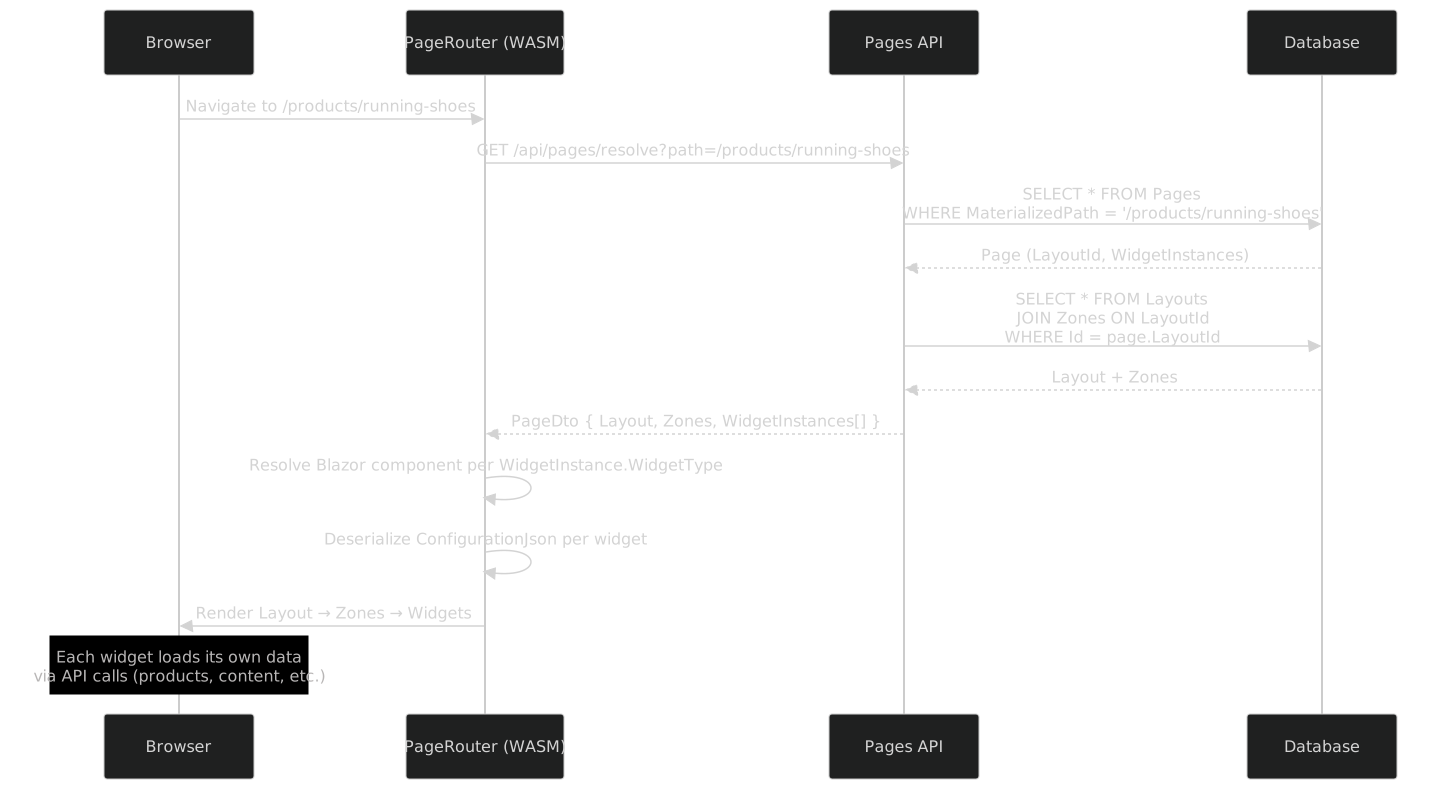
URL Resolution Flow
When a user navigates to a URL in the Blazor WASM SPA, the page router resolves the URL to a page, loads its layout and widgets, and renders the composed result.
Materialized Paths
Pages use materialized paths for efficient tree queries. The materialized path is the concatenation of all ancestor slugs:
| Page | Slug | Materialized Path |
|---|---|---|
| Home | / |
/ |
| Products | products |
/products |
| Running Shoes | running-shoes |
/products/running-shoes |
| Trail Boots | trail-boots |
/products/trail-boots |
| About | about |
/about |
| Blog | blog |
/blog |
Materialized paths enable:
- O(1) URL resolution: exact match on the
MaterializedPathcolumn (indexed) - Subtree queries:
WHERE MaterializedPath LIKE '/products/%'finds all descendants - Breadcrumbs: split the path to reconstruct the ancestor chain
- Sitemap generation: query all published pages ordered by path
When a page is moved (reparented), the framework updates the materialized paths of the page and all its descendants in a single batch operation.
Bound Entity Pages
A page can be bound to a domain entity via its RoutablePart slug. When the URL /products/running-shoes is resolved:
- The router finds the page at materialized path
/products - The remaining segment
running-shoesis treated as an entity slug - The page's widgets receive the slug as a
[Parameter](e.g.,ProductShowWidget.EntitySlug) - Each widget loads the entity by slug from the API
This enables dynamic entity pages without creating a page-tree node per entity. The "Products" page acts as a template; the slug suffix selects the specific product.
SEO Support
The page router generates SEO metadata for each page:
- Canonical URLs: computed from the materialized path and domain
- Meta tags: from the page's
MetaTitleandMetaDescription, or from the bound entity'sSeoablePart - Sitemap.xml: generated from all published pages with their canonical URLs
- Open Graph tags: from
SeoablePart.OgImagewhen available
// Generated: PageSeoMiddleware.g.cs
public class PageSeoMiddleware
{
    public async Task<PageSeoData> GetSeoDataAsync(Page page, string? entitySlug)
    {
        var seo = new PageSeoData
        {
            Title = page.MetaTitle ?? page.Title,
            Description = page.MetaDescription,
            CanonicalUrl = page.CanonicalUrl ?? page.MaterializedPath,
        };

        // If bound to an entity with SeoablePart, overlay entity SEO data
        if (entitySlug is not null)
        {
            var entitySeo = await _contentApi.GetSeoDataAsync(
                page.BoundEntityType, entitySlug);
            if (entitySeo is not null)
            {
                seo.Title = entitySeo.MetaTitle ?? seo.Title;
                seo.Description = entitySeo.MetaDescription ?? seo.Description;
                seo.OgImage = entitySeo.OgImage;
            }
        }

        return seo;
    }
}
Blazor WASM SPA Rendering
The page renderer is a Blazor WASM component that composes the layout, zones, and widgets at runtime:
// Framework component: PageRenderer.razor
@namespace Cmf.Pages.Client.Components

<DynamicComponent Type="LayoutComponentType" Parameters="LayoutParameters">
    @foreach (var zone in PageData.Layout.Zones.OrderBy(z => z.Name))
    {
        <CascadingValue Name="ZoneName" Value="zone.Name">
            <div class="zone zone-@zone.Name.ToLower()">
                @foreach (var widget in GetWidgetsForZone(zone.Id))
                {
                    <DynamicComponent Type="ResolveWidgetType(widget.WidgetType)"
                        Parameters="DeserializeConfig(widget)" />
                }
            </div>
        </CascadingValue>
    }
</DynamicComponent>

@code {
    [Parameter, EditorRequired]
    public PageDto PageData { get; set; } = default!;

    [Parameter]
    public string? EntitySlug { get; set; }

    private Type LayoutComponentType
        => WidgetCatalog.ResolveLayout(PageData.Layout.TemplateComponent);

    private IEnumerable<WidgetInstanceDto> GetWidgetsForZone(Guid zoneId)
        => PageData.WidgetInstances
            .Where(w => w.ZoneId == zoneId)
            .OrderBy(w => w.SortOrder);

    private Type ResolveWidgetType(string widgetType)
        => WidgetCatalog.Resolve(widgetType);

    private IDictionary<string, object?> DeserializeConfig(WidgetInstanceDto widget)
    {
        var config = JsonSerializer.Deserialize<Dictionary<string, object?>>(
            widget.ConfigurationJson);

        // Inject entity slug if widget accepts it
        if (EntitySlug is not null)
            config["EntitySlug"] = EntitySlug;

        return config;
    }
}
Generated Artifacts from PageWidget
The source generator produces per-widget:
// Generated: WidgetCatalog.g.cs
public static partial class WidgetCatalog
{
    public static IReadOnlyDictionary<string, WidgetDescriptor> Widgets { get; } =
        new Dictionary<string, WidgetDescriptor>
        {
            ["ProductList"] = new(
                Name: "ProductList",
                ComponentType: typeof(ProductListWidget),
                Module: "Product",
                Description: "Paginated product grid with category filter",
                Icon: "grid",
                ConfigProperties: new[]
                {
                    new WidgetConfigDescriptor("Category", typeof(string),
                        Required: false, DefaultValue: null),
                    new WidgetConfigDescriptor("PageSize", typeof(int),
                        Required: false, DefaultValue: "12"),
                    new WidgetConfigDescriptor("ShowPrices", typeof(bool),
                        Required: false, DefaultValue: null),
                    new WidgetConfigDescriptor("SortBy", typeof(string),
                        Required: false, DefaultValue: "Name"),
                }),
            ["ProductShow"] = new(
                Name: "ProductShow",
                ComponentType: typeof(ProductShowWidget),
                Module: "Product",
                Description: "Single product detail view",
                Icon: "package",
                ConfigProperties: new[]
                {
                    new WidgetConfigDescriptor("ShowGallery", typeof(bool),
                        Required: false, DefaultValue: null),
                    new WidgetConfigDescriptor("ShowRelated", typeof(bool),
                        Required: false, DefaultValue: null),
                    new WidgetConfigDescriptor("RelatedCount", typeof(int),
                        Required: false, DefaultValue: "4"),
                }),
            // ... other widgets
        };

    public static Type Resolve(string widgetType)
        => Widgets.TryGetValue(widgetType, out var desc)
            ? desc.ComponentType
            : throw new InvalidOperationException($"Unknown widget: {widgetType}");
}
The generator also produces admin configuration forms for each widget:
// Generated: ProductListWidgetConfigForm.razor
@namespace MyStore.Admin.Widgets

<div class="widget-config-form">
    <AdminDropdownField Label="Category" @bind-Value="Config.Category"
        Options="@ProductCategoryOptions"
        HelpText="Filter by product category" />
    <AdminNumberField Label="Page Size" @bind-Value="Config.PageSize"
        HelpText="Number of products per page" />
    <AdminCheckboxField Label="Show Prices" @bind-Value="Config.ShowPrices" />
    <AdminDropdownField Label="Sort By" @bind-Value="Config.SortBy"
        Options="@SortOptions" />
</div>

@code {
    [Parameter, EditorRequired]
    public ProductListWidgetConfig Config { get; set; } = default!;
}
Complete Example: E-Commerce Site
An e-commerce site composed using the Pages DSL:
Layouts
| Layout | Zones | Used By |
|---|---|---|
| FullWidth | Header, MainContent, Footer | Home, About |
| TwoColumn | Header, MainContent, Sidebar, Footer | Product catalog |
| ProductDetail | Header, MainContent, RelatedProducts, Footer | Product pages |
Page Tree Configuration (Runtime Data)
| Page | Layout | Zone: MainContent | Zone: Sidebar |
|---|---|---|---|
Home (/) |
FullWidth | StreamFieldContentWidget (Hero + RichText) | -- |
Products (/products) |
TwoColumn | ProductListWidget | CategoryFilterWidget |
Running Shoes (/products/running-shoes) |
ProductDetail | ProductShowWidget | -- |
About (/about) |
FullWidth | StreamFieldContentWidget (RichText) | -- |
What Happens When a User Visits /products
- Browser navigates to
/products - PageRouter calls
GET /api/pages/resolve?path=/products - API returns: Page (TwoColumn layout, 2 widget instances)
- PageRenderer loads TwoColumn layout component
- For zone "MainContent": instantiates
ProductListWidgetwith config{category: null, pageSize: 12} - For zone "Sidebar": instantiates
CategoryFilterWidgetwith config{showCounts: true} - Each widget makes its own API call to load data
- The composed page renders in the browser
What Happens When a User Visits /products/running-shoes
- Browser navigates to
/products/running-shoes - PageRouter calls
GET /api/pages/resolve?path=/products/running-shoes - No page exists at this exact path. The router falls back to the parent page
/productswith entity slugrunning-shoes - The
/productspage is configured as a bound entity page for theProductaggregate - The router resolves to the ProductDetail layout with
EntitySlug = "running-shoes" ProductShowWidgetreceives the slug, callsGET /api/products/by-slug/running-shoes- The product detail renders with gallery, description, and related products
Compile-Time Validation (Stage 1)
| Diagnostic | Severity | Rule |
|---|---|---|
| PGS001 | Error | [PageWidget] has empty Module |
| PGS002 | Error | [WidgetConfig] on a property with unsupported type |
| PGS003 | Warning | [PageWidget] references Module not matching any [AdminModule] |
| PGS004 | Warning | Widget has zero [WidgetConfig] properties (no editor will be generated) |
Summary
The Pages DSL combines compile-time widget definition with runtime page composition:
| Layer | Defined At | Storage | Who Manages |
|---|---|---|---|
| PageWidget components | Compile time | Source code | Developers |
| Widget catalog | Generated | Source code | Compiler |
| Widget config forms | Generated | Source code | Compiler |
| Pages, layouts, zones | Runtime | Database | Content editors |
| Widget instances | Runtime | Database (JSON config) | Content editors |
| URL routing | Runtime | Materialized paths | Framework |
The developer defines widgets as Blazor components with [PageWidget] and [WidgetConfig]. The compiler generates the widget catalog and admin configuration forms. Content editors compose pages from layouts, zones, and widgets through the admin interface. The Blazor WASM SPA renders the composed result, with each widget loading its own data via API calls.